Win10 鼓勵使用 Microsoft 帳戶(MSA)登入,導致登入/鎖定畫面預設明文顯示完整 Email 地址。唯有使用本機帳戶登入時才不顯示 Email。
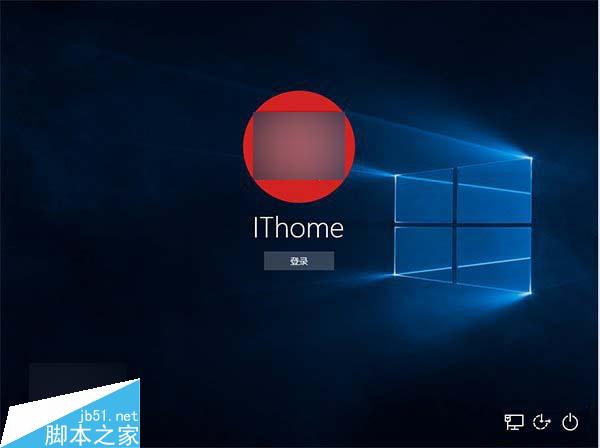
在「Windows 意見回饋」App 中,大量使用者支持「登入畫面隱藏 Email」建議,微軟至今未正式回應。技術上僅需在 UI 層遮罩或提供切換開關,實作難度極低。
若微軟採納,預期可在 2016 年 Redstone (RS1/RS2) 更新中見到改善。在此之前,建議:
Win10 工作列音量圖示消失?完整恢復教學:啟用系統圖示、調整音量滑桿、設定播放裝置層級與增強功能
Win7/Win8.1 升級 Win10 後睡眠功能消失?群組原則啟用待機 (S1-S3) 修復教學
調整 Win7 任務欄 Aero Peek 縮圖大小,修改登錄檔 MinThumbSizePx 輕鬆放大縮小
Win10 螢幕亮度自適應怎麼開關?電源選項與感測器服務雙重控制
Windows 10 Mobile 10512 快速通道推送開啟:升級步驟與注意事項
Win8/Win8.1 開啟攝影機 (相機) 兩大方法:內建 App 與第三方軟體 ECAP
Win10 Build 10049 Hyper-V 虛擬機無法啟動?微軟官方解釋與暫時解決方案
Win10 Build 986x 將引入流暢視窗轉場動畫:應用啟動如從圖標飛出、最小化如折疊回工作列,體驗媲美 OS X 但操作邏輯不同