gpedit.msc 開啟本機群組原則編輯器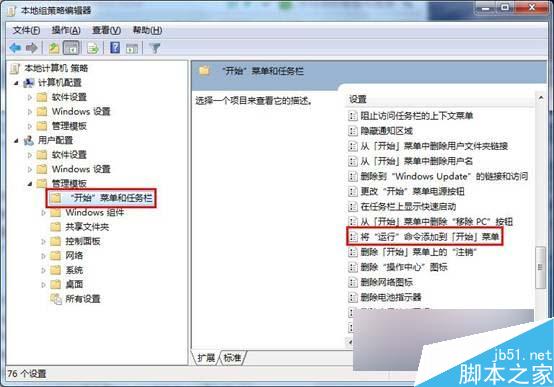
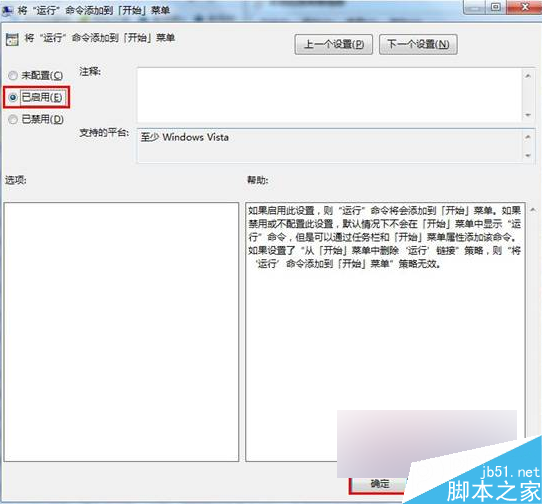
設定完成後,「執行」指令即會出現在開始功能表中,方便快速輸入指令啟動程式或開啟系統工具。
Win7 滑鼠停用後卡頓?關閉 USB 選擇性暫停設定徹底解決
Win10 批量授權版如何查看剩餘授權天數?slmgr.vbs -xpr 一鍵查詢,附到期後續授權說明
Win10 升級後如何清除最近開啟檔案記錄?檔案總管清除、關閉記錄、第三方工具深度清理三步驟
Win7 找不到 ctfmon.exe 導致輸入法失效?修改登錄加入啟動項即可修復
VirtualBox 安裝 Windows 8 完整教學與常見問題解決
Win10 開始選單與 Cortana 無法開啟?三大臨時解決方案快速修復
Windows 2012 / 7 / 8 修改遠端桌面 3389 埠號完整教學:註冊表修改雙路徑 + 防火牆規則同步更新