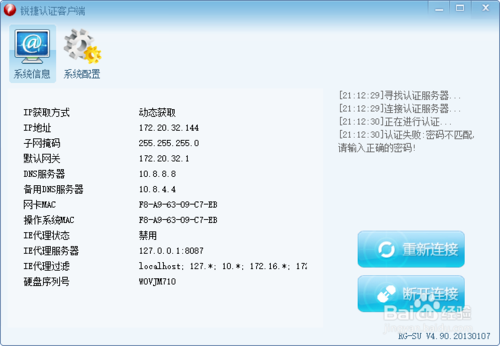
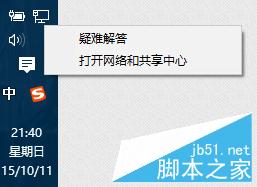
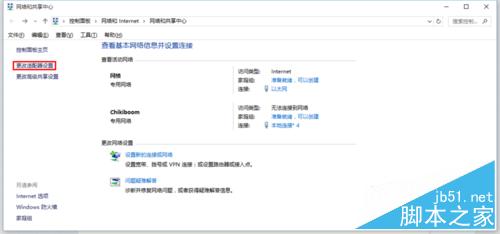
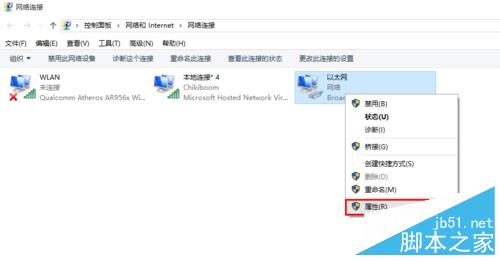
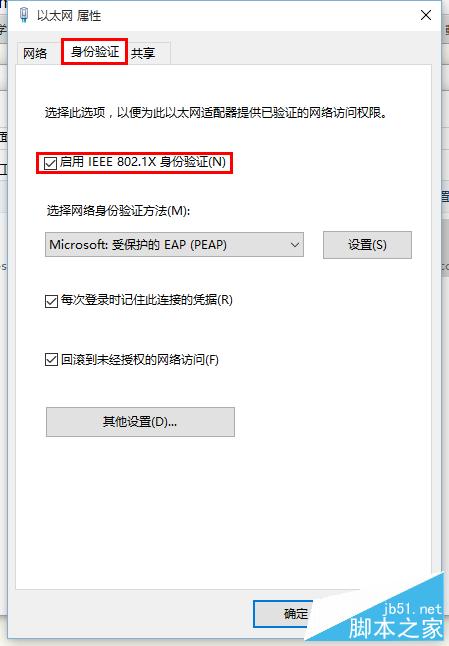
校園網常使用銳捷客戶端認證,筆電開啟熱點供手機上網時,若隔一段時間雙雙斷網且銳捷提示密碼錯誤,可嘗試以下設定:
此問題源於 802.1X 驗證與熱點軟體衝突,關閉後可穩定共享網路。
Windows 10 正式版何時升級?各國當地 29 號 0 點開始推送,美東時間 28 日晚 9 點
Win7 新增網路印表機完整圖文教學:從「裝置和印表機」三步驟完成設定
Win8 如何清理磁碟?兩種內建工具輕鬆釋放空間
Win10 查看、刪除、修改 Wi-Fi 密碼完整教學
Win10 開不了軟體跳「檔案遺失」?相容模式一招搞定
Win10 引入全新視窗陰影效果:細微視覺讓視窗彷彿懸浮桌面之上
Win10 執行魔獸世界等遊戲卡頓/掉幀/掉線?關閉或移除 Xbox Game DVR 即可解決
Win10 Mobile 10586.104 升級截圖曝光:累積更新修復 Bug 提升效能,為正式推送 WP8.1 做準備