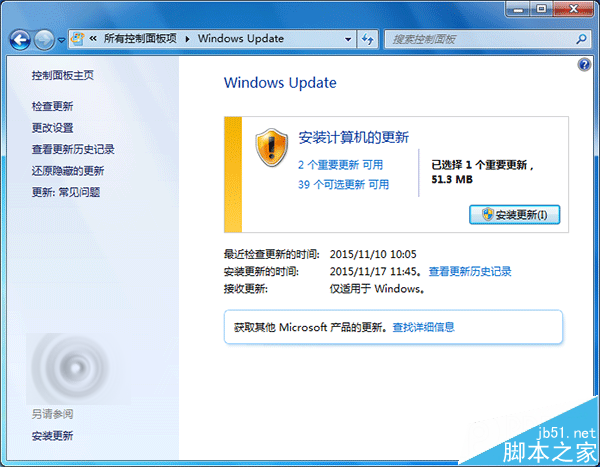
微軟針對 Windows 7、Windows Vista、Windows Server 2008/R2 等系統,發布 2015 年 11 月安全更新彙總套件離線安裝 ISO 映像檔 (檔名:Windows-KB913086-201511.iso,大小 3.9GB)。適用於無法連網環境、大量部署、或 Windows Update 損毀無法線上更新的系統。
套件基本資訊
| 項目 |
內容 |
| 檔案名稱 |
Windows-KB913086-201511.iso |
| 版本 |
913086 |
| 發布日期 |
2015/11/20 |
| 檔案大小 |
3.9 GB |
| 支援語言 |
多國語言 (含繁體中文、簡體中文、英文等) |
包含的知識庫文章 (12 篇 KB)
- KB3081320
- KB3100213
- KB3101246
- KB3092601
- KB3101722
- KB3102939
- KB3100773
- KB3097877
- KB3101746
- KB3105216
- KB3103688
- KB3108604
對應的安全公告 (8 項 MS)
- MS15-121
- MS15-114
- MS15-122
- MS15-119
- MS15-117
- MS15-120
- MS15-112
- MS15-115
支援的作業系統
- Windows 7 (RTM / SP1)
- Windows Server 2008 (SP2)
- Windows Server 2008 R2 (RTM / SP1)
- Windows Vista (SP1 / SP2, 32/64 位元)
- Windows Server 2003 (SP2, x86/x64/Itanium) — 注意:Win2003 已停止主流支援,此為延伸安全更新
使用方式
- 下載 ISO (建議使用支援斷點續傳的下載工具,如迅雷、IDM、Free Download Manager)。
- 燒錄至 DVD (需雙層 DVD-R 8.5GB) 或使用 Rufus/Windows USB/DVD Download Tool 製作啟動 USB。
- 在目標電腦掛載 ISO / 插入安裝媒體 → 執行
Setup.exe 或從媒體開機安裝更新。
- 或掛載 ISO 後,以系統管理員身分執行 CMD,依序安裝
.msu 套件:
for %f in (D:\*.msu) do wusa %f /quiet /norestart (D: 為掛載磁碟機代號)。
重要提醒 (官方說明)
- 此 ISO 僅包含 Windows 安全更新,不含 Office、SQL Server、Exchange 等其他 Microsoft 產品更新。
- 部署前請務必查閱各安全公告詳細內容 (https://technet.microsoft.com/en-us/security/bulletin),確認是否有更新版本取代。
- 建議搭配 WSUS (Windows Server Update Services) 或 SCCM 進行企業環境統一部署,而非手動逐台安裝。
- Windows 7 主流支援已於 2015/1/13 結束,延伸支援至 2020/1/14 結束。2020 年後僅 ESU (延伸安全更新) 付費訂閱用戶可獲更新。
⚠ 歷史背景: 此為 2015 年 11 月釋出之歷史套件。現今 (2024+) Windows 7 已完全停止更新 (含 ESU)。若維護舊系統,建議隔離網路、啟用 AppLocker/WDAC 白名單、部署第三方防護 (如 0patch 微補丁) 降低風險。