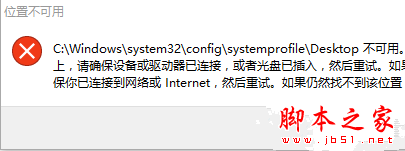
升級至 Windows 10 10586 版本後,部分使用者在下載軟體(如迅雷)中直接開啟 WinRAR 壓縮檔時,會彈出「位置不可用」的錯誤視窗。雖然點擊確定後仍能正常開啟檔案,但頻繁跳出錯誤確實令人困擾。這通常是因為系統缺少 C:\Windows\System32\config\systemprofile\Desktop 資料夾所導致。
C:\Windows\System32\config\systemprofile\Desktop
C:\Windows\System32\config\systemprofile
完成後再次嘗試開啟 WinRAR 壓縮檔,錯誤訊息將不再出現。
Win7 一鍵批量結束重複進程:taskkill 指令讓任務管理器告別手動逐個關閉
XP 系統工作管理員被停用無法開啟?群組原則一鍵恢復
Win8 無法進入 LOL 游戲彈出「whoops something broke」?調大虛擬記憶體至 2048-4096MB 解決
Win8.1 Win+PrtSc 螢幕截圖不存檔僅存剪貼簿:重設使用者設定檔解決
Windows 10 UAC 對話框無法點選「是」?啟用內建 Administrator 並加入管理員群組解決
Win10 開機慢怎麼辦?啟用快速啟動 + 停用不需開機啟動項 2 招加速開機
Windows 10 正式版更新 KB3081424 陷入無限重啟死循環:民間臨時解法與微軟後續修正
Win10 Build 10532 vs 10525 差異在哪?無新功能、修正 Bug、右鍵選單與 Edge 微調