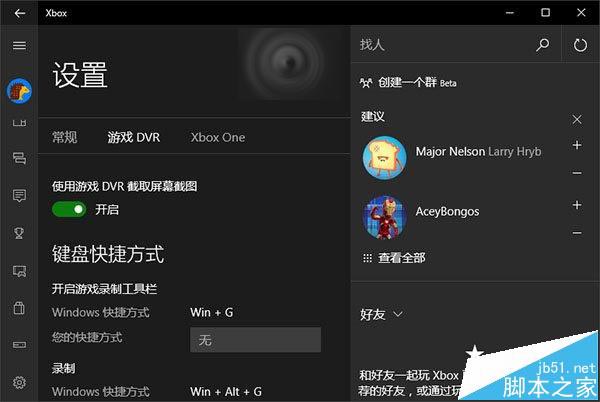
Win10 新功能對玩家吸引力大(DirectX 12、Xbox 應用、串流遊戲),但部分玩家遇到鍵鼠延遲,全螢幕/3D 遊戲更明顯。除硬體、驅動、網路因素外,Xbox 應用的 Game DVR 功能也是常見原因。
若需保留此功能且確認導致延遲,只能等待 Microsoft 更新修復。
相關推薦:
Windows 10 更新/應用商店錯誤 0x80072EFD:防火牆/防毒軟體阻擋網路連線排查
Windows 10 最終硬體需求公布:幾年前的舊電腦也能輕鬆跑
Win10 連 Wi-Fi 彈出「網路身分驗證」視窗?關閉 802.1X 驗證即可
Windows 7 清除搜尋方塊歷史記錄:群組原則關閉「顯示最近搜尋項目」保護隱私
Windows 下 XAMPP 安裝設定完整圖文教學 (Apache + MySQL + PHP + phpMyAdmin)
Win10 關閉 Windows Defender 內建防毒:群組原則一鍵永久停用
Win7 玩 LOL 提示「登入失敗,請重試」三大解決方案
Windows 7 建立 ADSL 寬頻撥號連線教學:桌面捷徑一鍵上網