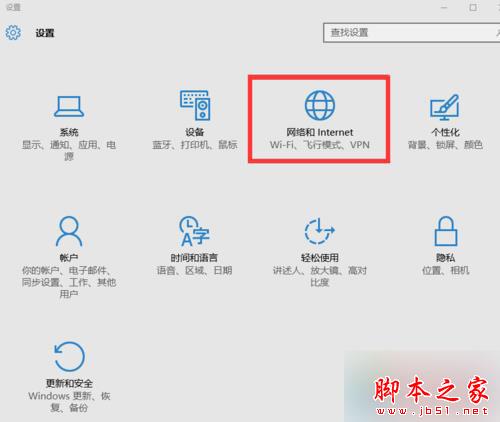
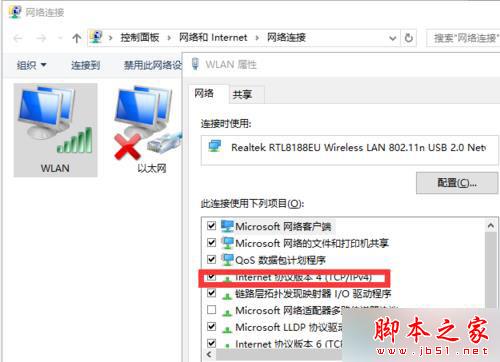
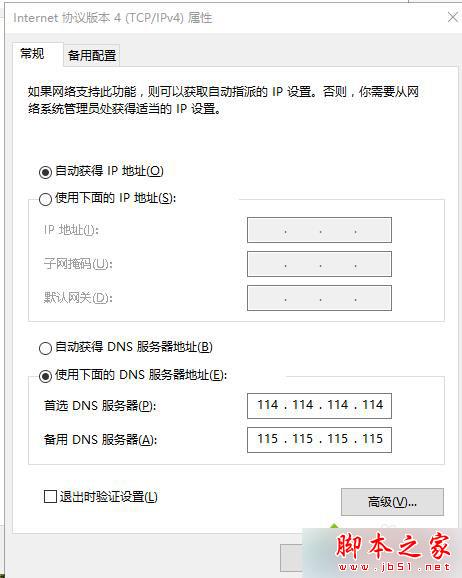
解決方法:
114.114.114.114
115.115.115.115
以上為 Win10 玩 LOL 遊戲大廳白屏完整解決方案,相同問題可依此設定解決。
Windows 7 安裝與設定 IIS 7 完整圖文教學(含 ASP 父路徑啟用)
Windows 7 區域連線被停用無法上網?兩種方法快速啟用網卡
Win10 如何開啟內建攝影機?搜尋「相機」或開始選單「所有應用程式」找 Camera 應用程式
Windows 10 自訂視窗顏色隱藏技巧:執行「Control Color」喚出傳統「色彩與外觀」對話框,可自由調配色相、飽和度、亮度
WinXP 無法刪除 AUTORUN.INF 資料夾?用批次指令 rmdir /s 強制刪除
Win7 開始選單被工作列遮擋?拖移工作列位置即可修復
Win7 家用版找不到「個人化」右鍵選單?版本限制導致,替代方案在此
新筆電只有 C 槽?手把手教你用 Windows 內建工具分割磁碟