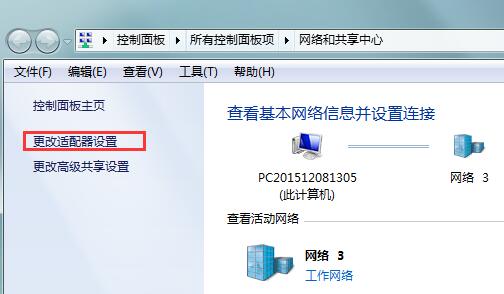
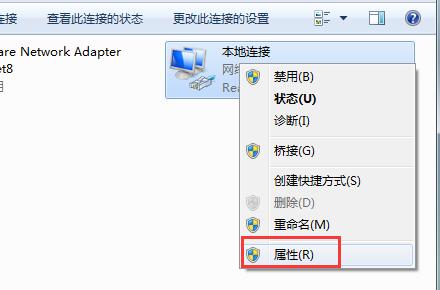
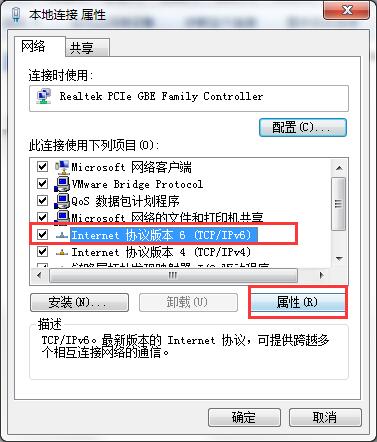
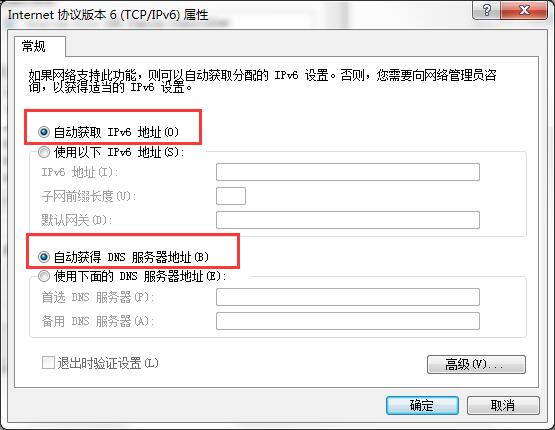
Win7 診斷顯示「預設閘道不可用」頻繁斷線。修復:網路圖示 → 網路與共用中心 → 變更介面卡設定 → 右鍵區域連線 → 內容 → 「網際網路通訊協定第 6 版 (TCP/IPv6)」 → 內容 → 選「自動取得 IPv6 位址」與「自動取得 DNS 伺服器位址」 → 確定 → 重開機。IPv6 設定錯誤常導致此問題。
Win10 10159 變更預設瀏覽器:設定 → 系統 → 預設應用程式 → 瀏覽器
消除 Win8/Win7 桌面圖示點選後的虛線框:五種快速方法
Win10 Mobile 10572 撥號盤支援游標編輯數字(附示範影片)
Win10 如何關閉 IPv6?網路介面卡屬性一鍵停用,解決網卡假死、未回應問題
Win7 關閉 UAC 使用者帳戶控制教學:透過群組原則徹底停用提示彈窗
為何推薦安裝 Win7 64 位旗艦版?i 系列 CPU、4G 以上記憶體必裝理由分析
Win10 自動更新在哪?如何設定進階選項
Win10 開始選單如何改回 Win7 經典樣式?Start10 與 Classic Shell 兩款神器推薦