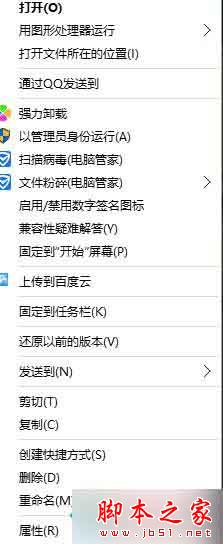
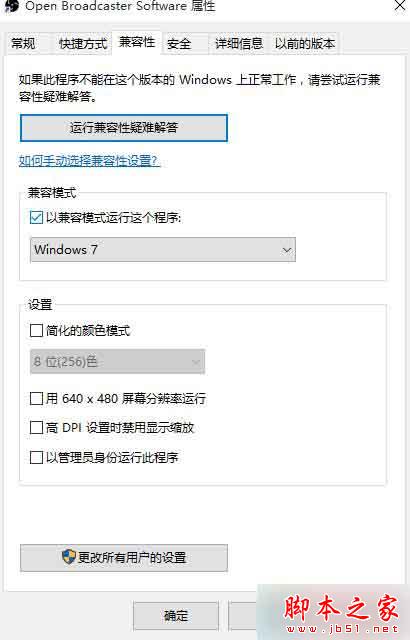
OBS 在 Win8/10 下直播畫面黑屏,多為軟體與系統相容性衝突。右鍵 OBS 執行檔 →「內容」→「相容性」→ 勾選「以 Windows 7 相容模式執行」→ 套用,重啟 OBS 即可正常捕捉畫面。
相關:Win8 雙顯卡開機黑屏解法。
Win10 問題回報設定灰色無法修改?用群組原則徹底關閉錯誤回報
Win10 系統需求規格:1GHz 處理器、1GB/2GB 記憶體、16GB/20GB 硬碟空間、DirectX 9 顯卡
Win7 刪除神秘 Q: 分區:解除安裝 Microsoft Office Click-to-Run 2010
Windows 7 開機自動撥號連網教學:使用工作排程器實現寬帶自動連線
Win10 如何刪除 PIN 碼?設定 → 帳戶 → 登入選項 → 刪除 PIN,需驗證密碼
Win10 Edge 瀏覽器新增 WebM、VP9、Opus 支援,線上影音體驗再升級
Windows 7 取得最高權限 TrustedInstaller:刪除系統檔案不再受阻
Windows 10 上手體驗:開始選單回歸、全域搜尋、磚塊自訂、Snap Assist、工作檢視、遠端關閉應用、Charms Bar 保留