高 DPI 螢幕 (4K、Retina 級) 下 QQ 介面字體極小,因舊版 QQ 未正確支援 DPI 縮放。QQ 內建 DPI 自適應選項可解決。


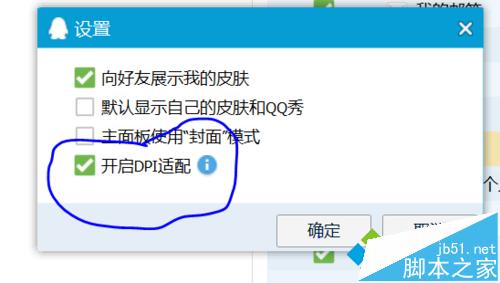
高 DPI 環境下,應用程式需宣告 DPI 感知 (Per-Monitor DPI Aware v2) 才能正確縮放,舊版 QQ 需手動開啟相容選項。
Win10 藍畫面太簡單?修改註冊表顯示詳細錯誤參數(傳統藍畫面模式)
Win10 開發版本躍升至 10100,BUILD 大會將推重大公開預覽版
Windows XP 清除系統暫存檔案:Temp 資料夾手動刪除釋放磁碟空間
Win10 安裝後無法上網?同樣是啟用多播協定與 Winsock 重置解決方案
Win10 C 槽磁碟碎片整理與清理:檔案總管 → 內容 → 工具 → 最佳化/磁碟清理
Win8.1 點擊「立即升級 Win10」閃退?卸載殺毒軟體、清除 SoftwareDistribution 快取重試
Win10 開啟 PS CS6 提示 "Configuration error: 16"?以管理員身分執行或相容性設定永久修復