Windows XP Windows 7 Windows 2003 Windows Vista Windows 綜合教學 Linux 系統教學
Windows 10 Windows 8 Windows 2008 Windows NT Windows Server 電腦軟體教學
您现在的位置: Windows教程網 >> Windows教程 >  >> Windows 綜合教學 >> 關於 Windows

Win8 還原出廠設定後無法啟動錯誤 0x80072EE2?關閉防火牆、修改 Hosts、改 DNS 教學

編輯:關於 Windows

預裝 Win8 還原出廠後無法啟動,錯誤碼 0x80072EE2。主因防火牆攔截、Hosts 檔封鎖微軟伺服器、DNS 解析異常。提供完整排除流程。
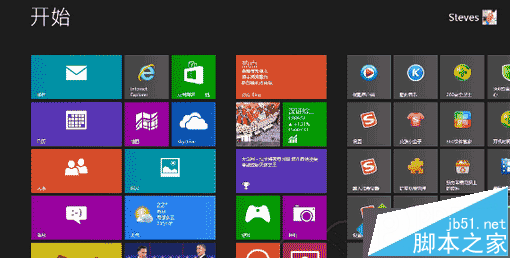
解決步驟

  1. 確認網路連線正常。
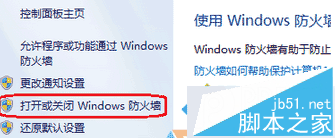
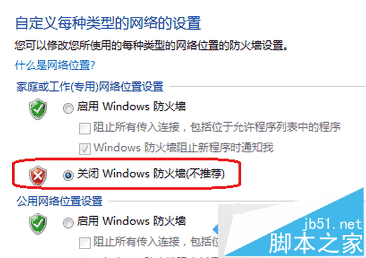
  2. 暫時關閉 Windows 防火牆,或將 *.microsoft.com 加入例外。
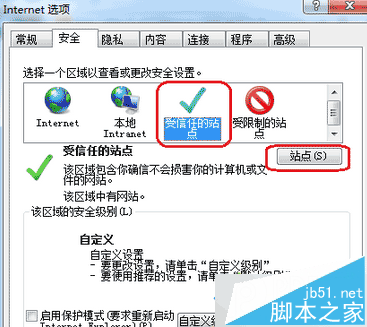
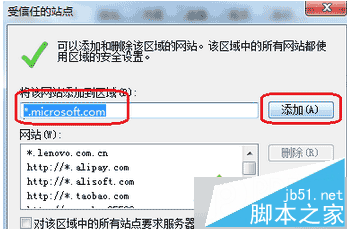
  3. IE「網際網路選項」→「安全性」→「信任的網站」→ 加入 *.microsoft.com。
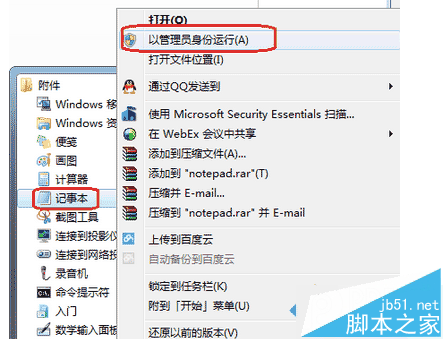
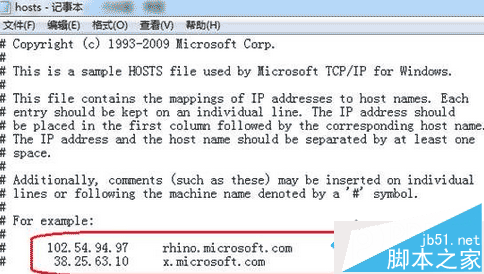
  4. 以管理員身分開啟記事本編輯 C:\Windows\System32\drivers\etc\hosts,刪除含微軟伺服器 IP 的行。
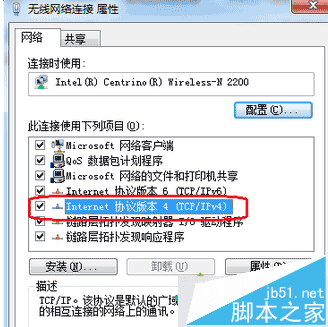
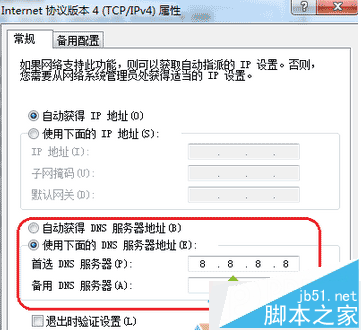
  5. 網卡 IPv4 DNS 改為 8.8.8.8(Google Public DNS)。

依序嘗試上述步驟,通常能恢復啟動連線。若仍失敗可嘗試 Win8 啟動工具。更多啟動問題請關注本站!

Copyright © Windows教程網 All Rights Reserved