Windows XP Windows 7 Windows 2003 Windows Vista Windows 綜合教學 Linux 系統教學
Windows 10 Windows 8 Windows 2008 Windows NT Windows Server 電腦軟體教學
您现在的位置: Windows教程網 >> Windows教程 >  >> Windows 綜合教學 >> 關於 Windows

Win7 無法開啟 .docx 檔案?教你三招輕鬆解決

編輯:關於 Windows

.docx 是 Office 2007 及更新版本的預設格式,若電腦僅安裝 Office 2003 或未安裝 Office,預設無法開啟。以下提供三種不需安裝完整 Office 套件的解決辦法。

方法一:將 .docx 改副檔名為 .zip 直接解壓(最快取出純文字與圖片)

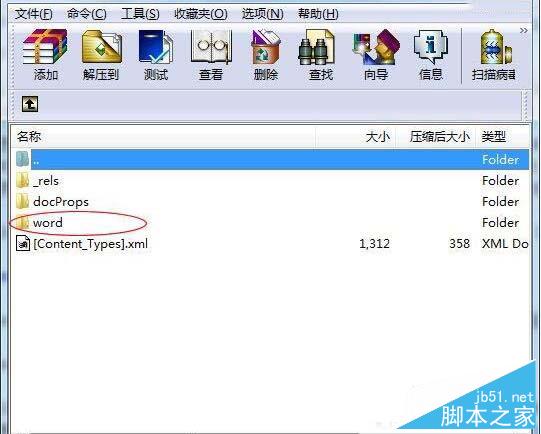
  1. 將檔案副檔名從 .docx 改為 .zip。
  2. 雙擊開啟壓縮檔,進入 word 資料夾。
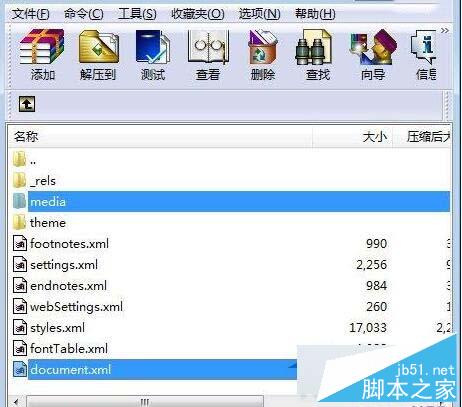
  3. document.xml 即為文件主體(含 XML 標籤),可用記事本開啟閱讀純文字。
  4. media 資料夾存放文件內嵌圖片,可直接複製使用。

方法二:安裝 Microsoft Word Viewer 2007(官方免費輕量檢視器)

  • 軟體名稱:Microsoft Office Word Viewer 2007 簡體中文安裝版
  • 大小:24 MB
  • 更新:2014-05-18
  • 下載安裝後即可直接開啟、列印 .docx 檔案,無需完整 Office。

方法三:使用線上轉檔或雲端文書工具

上傳至 Google Docs、OneDrive 或使用線上轉檔網站(如 CloudConvert),即可在瀏覽器中閱讀、編輯並另存為 .doc 或 .pdf。

依照使用情境選擇:臨時閱讀用方法一最快;長期需求建議安裝 Viewer 或改用雲端工具。

Copyright © Windows教程網 All Rights Reserved