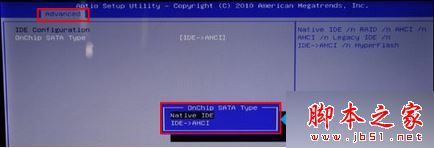
筆記本用 GHOST 盤重裝 XP 系統時出現 code 5555h 錯誤無法執行 GHOST。主要原因是硬碟運作模式 AHCI 與 XP 內建驅動不相容,改為 IDE 模式即可。
Win10 正式版降級回 Win7?設定 → 更新與安全性 → 復原 →「回復到 Windows 7」一鍵還原(需重新啟用 Win7 授權)
Windows 10 觸控板手勢操作大全:六大新手勢提升效率
Win7 Windows Update 失敗報錯 0x80070005?以管理員身分登入 + 掃毒雙管齊下快速修復權限拒絕
Win8.1 Aero Glass 安裝遇黑屏/不相容彈窗?補裝 Windows SDK 修復相容性
Win10 新功能曝光:持續優化高 DPI 縮放,4K 螢幕支援大幅提升
Win10 IE11 提示未安裝 Flash Player?系統內建 Flash 損壞修復完整教學
Windows 10 手機版跳過 10136 直推 10145:Build 10145 內部測試中、本週或下週推送、預計無重大新功能專注修補 Bug