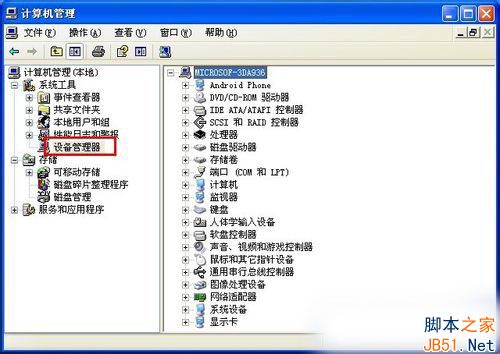
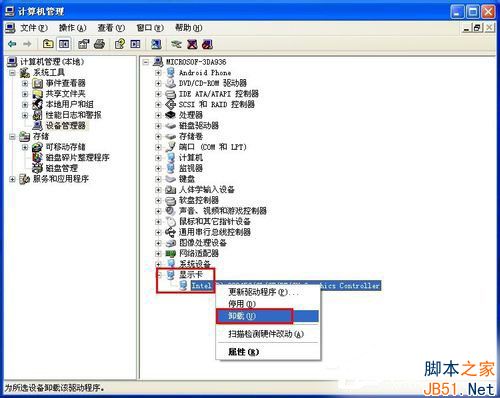
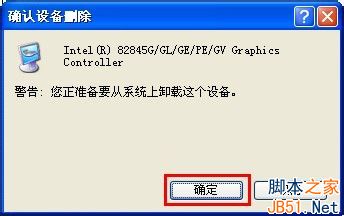
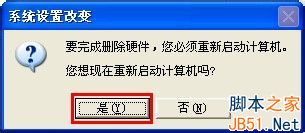
Windows XP 解除安裝顯示卡驅動程式失敗時,可透過裝置管理員強制移除。
更新顯示卡驅動前建議先依此法移除舊驅動,避免殘留檔案衝突。
Win10 小娜語音無法開啟「掃雷」?用「捷徑的捷徑」技巧加入語音指令
Windows 8 運行大型軟體提示虛擬記憶體不足?原因分析與設定指引
Win7 IE瀏覽器網頁輸入框無法輸入文字?註冊表修復法
Win7/Win8 傳統 BIOS 模式安裝 SteamOS 完整圖文教學 (支援雙開機)
Win10 開啟檔案提示「檔案系統錯誤 -2147416359」?一鍵修復 Windows License Manager 服務
Win10 開機提示「硬體設定已變更,請重新開機」解決方案:更新/回滾 AMD 顯卡驅動
Win10 Windows Update 現蹤 TH2/RS1 更新分支選項:部分用戶可在進階設定見 RedStone RS1 快速通道
Win10 更新卡住無法取消?清理 SoftwareDistribution 快取 + 乾淨啟動強制修復