Windows XP Windows 7 Windows 2003 Windows Vista Windows 綜合教學 Linux 系統教學
Windows 10 Windows 8 Windows 2008 Windows NT Windows Server 電腦軟體教學
您现在的位置: Windows教程網 >> Windows教程 >  >> Windows 綜合教學 >> 關於 Windows

Win10 應用商店錯誤 0x80070422 原因與一鍵修復教程

編輯:關於 Windows

許多 Win10 用戶回報:點擊應用商店任意應用均無法進入下載頁,彈出錯誤代碼 0x80070422。經排查,根因是 Windows Update 服務被停用,導致商店無法驗證授權與下載內容。

快速修復步驟(圖文)

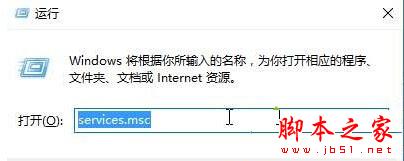
  1. 按 Win + R 輸入 services.msc 回車,開啟「服務」管理單元。
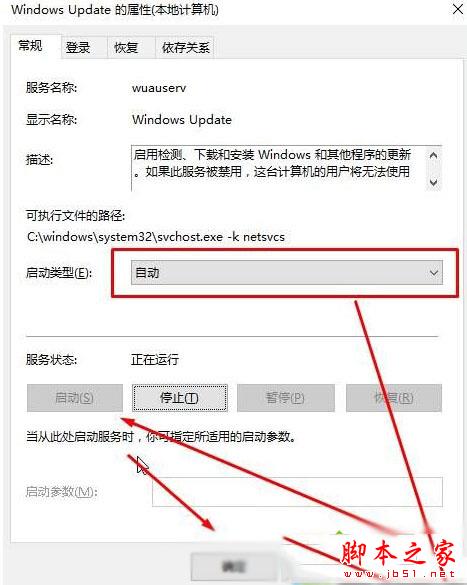
  2. 在列表中找到 Windows Update,雙擊開啟屬性。
  3. 「啟動類型」下拉選 自動 → 點「套用」 → 點「啟動」 → 確定。
  4. 重新開啟應用商店測試,問題通常即刻解決。

原理說明

應用商店依賴 Windows Update 服務進行授權檢查與內容分發。若該服務被手動停用或第三方優化工具關閉,商店即會拋出 0x80070422(服務未啟動)。

延伸排查

  • 若服務已是「自動」但仍報錯,檢查 Background Intelligent Transfer Service (BITS) 是否同樣啟動。
  • 執行 wsreset.exe 清理商店快取作為輔助。
  • 確認系統時間/時區正確,避免 SSL 憑證驗證失敗。

相關閱讀: Win10 應用商店打不開的兩種通用解決方法

Copyright © Windows教程網 All Rights Reserved