Windows XP Windows 7 Windows 2003 Windows Vista Windows 綜合教學 Linux 系統教學
Windows 10 Windows 8 Windows 2008 Windows NT Windows Server 電腦軟體教學
您现在的位置: Windows教程網 >> Windows教程 >  >> Windows 綜合教學 >> 關於 Windows

Win7/Win8.1 右鍵選單「新建」消失?註冊表修復 ContextMenuHandlers\New 鍵值秒回

編輯:關於 Windows

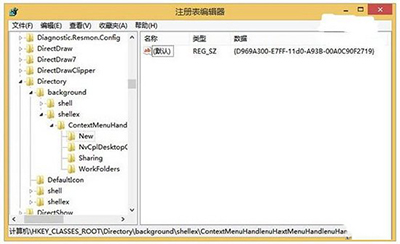
Win7/8.1 桌面右鍵選單「新建」項目消失,原因是註冊表 HKEY_CLASSES_ROOT\Directory\Background\shellex\ContextMenuHandlers\New 的預設值被修改或損毀。修復方法:還原正確 GUID。

修復步驟(操作前建議備份註冊表)

  1. Win + R → regedit 開啟登錄編輯器。
  2. 展開至:HKEY_CLASSES_ROOT\Directory\Background\shellex\ContextMenuHandlers\New
  3. 檢查右側「預設」值是否為 {D969A300-E7FF-11d0-A93B-00A0C90F2719}。若非,雙擊修改為此值。
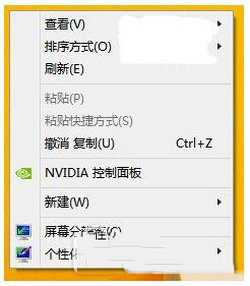
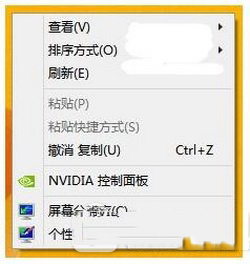
  4. 按 F5 重新整理註冊表,右鍵選單「新建」即刻恢復。

此法可快速找回消失的「新建」選單,無需重裝系統。

Copyright © Windows教程網 All Rights Reserved