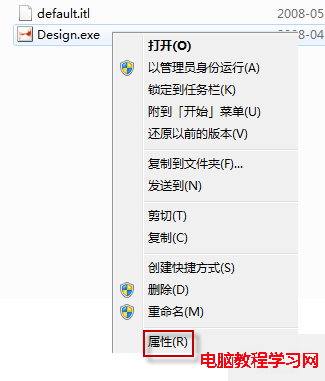
Windows 7 執行程式需管理員權限時,通常右鍵選「以系統管理員身分執行」或 Ctrl+Shift+點擊。若特定程式每次都需提權,可在程式屬性永久設定。
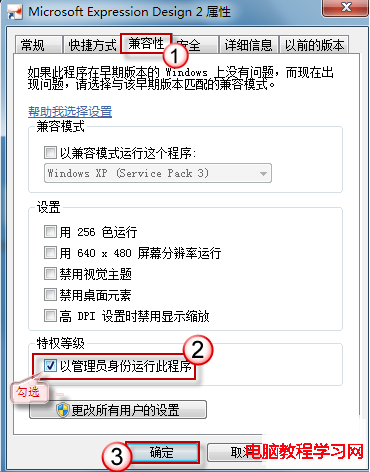
之後雙擊即自動提權,免去重複操作。適用於需寫入系統目錄、登錄的舊版軟體或維護工具。
Win10 系統下 QQ 2D 桌球無法啟動?教你用相容模式輕鬆解決
Windows 7/8.1/10 更新出現錯誤 8024000B?官方解決方案一步到位
Windows 8 內建虛擬光碟機掛載 ISO 檔案教學:三步驟免安裝第三方軟體
Win8 升級後 IE 無法開啟?執行 netsh winsock reset 重置網路目錄即可修復
重裝 Win7 旗艦版後前置耳機孔無聲音?Realtek 音訊管理器停用前面板偵測即可恢復
Win10 如何關閉 Windows 檔案保護?群組原則設定「Windows 檔案保護掃描」為已停用
Win10 最需改進 10 項:檔案總管標籤、驅動更新整合、波斯曆、Aero Glass、圖標重設計、強化記事本、免費升級、任意釘選、應用獨立音訊、合併設定介面