Windows XP Windows 7 Windows 2003 Windows Vista Windows 綜合教學 Linux 系統教學
Windows 10 Windows 8 Windows 2008 Windows NT Windows Server 電腦軟體教學
您现在的位置: Windows教程網 >> Windows教程 >  >> Windows 綜合教學 >> 關於 Windows

Windows 8 內建虛擬光碟機掛載 ISO 檔案教學:三步驟免安裝第三方軟體

編輯:關於 Windows

Windows 8 內建 ISO 掛載功能,無需安裝 Daemon Tools 等第三方虛擬光碟機軟體,即可直接掛載、存取、卸載光碟映像檔。本文圖文教學三步驟完成操作。

操作步驟

  1. 掛載:在檔案總管中找到 ISO 檔案,右鍵點擊選擇「掛載」。系統會自動建立虛擬光碟機並指派磁碟機代號。
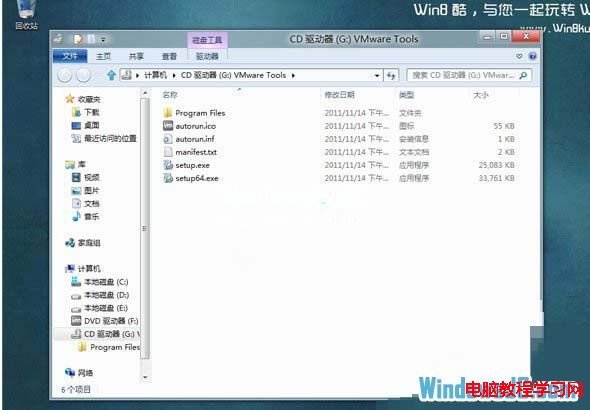
  2. 存取:掛載完成後,虛擬光碟機會自動開啟,即可像使用實體光碟一樣存取檔案、執行安裝程式。
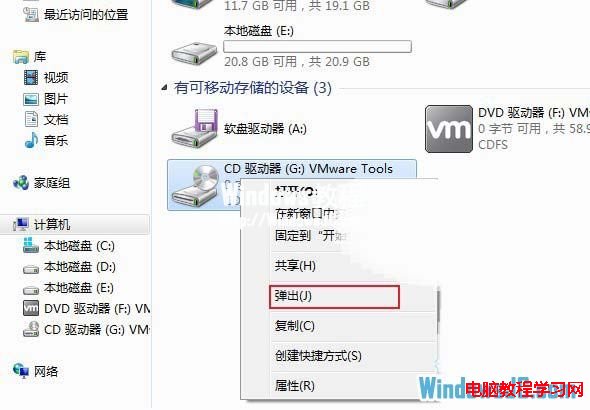
  3. 卸載:使用完畢時,在「電腦」視窗中對虛擬光碟機按右鍵,選擇「推出」即可卸載。若不卸載,重複掛載會產生多個虛擬光碟機。
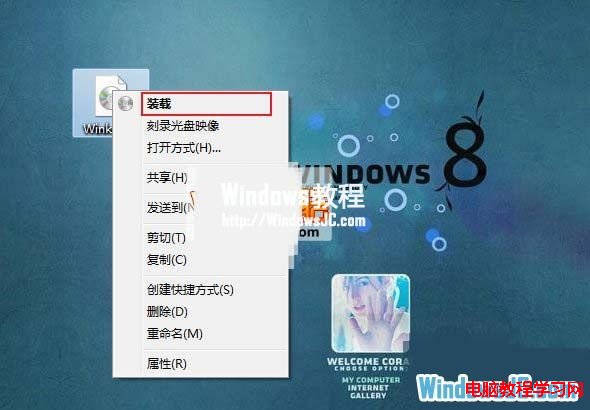
ISO 檔案右鍵選單掛載選項

掛載後自動開啟虛擬光碟機

虛擬光碟機右鍵推出卸載

Windows 8/8.1/10/11 皆支援此原生功能,輕量、免安裝、相容性佳,是處理 ISO 檔案的最佳選擇。

Copyright © Windows教程網 All Rights Reserved