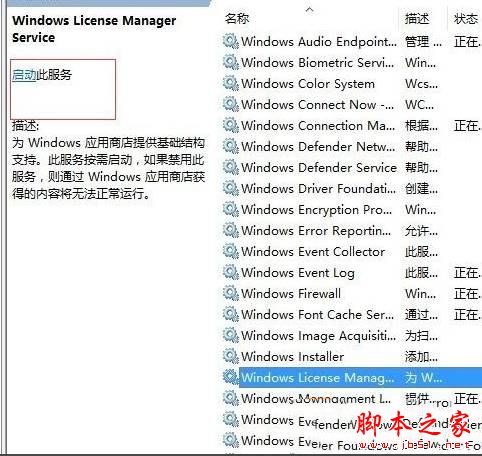
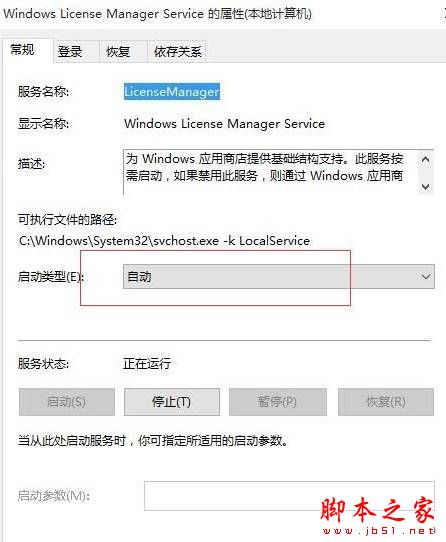
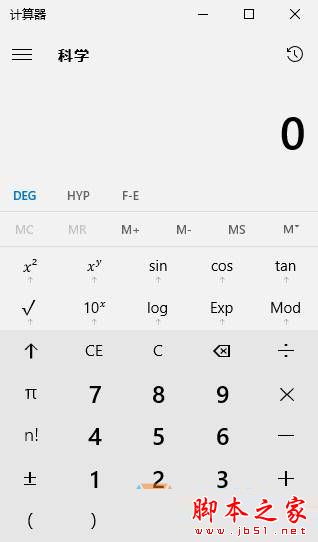
Win10 1607 版本更新後,內建計算機 App 開啟即閃退,主因是 Windows License Manager Service 服務未啟動導致授權驗證失敗。啟用該服務並設為自動即可修復。
services.msc
UWP App (含計算機、鬧鐘、錄音機) 需透過 License Manager 驗證授權狀態。服務停用時 App 啟動即因授權失敗而自我終止,設為自動可確保開機即可用。
如何查看 Windows 激活資訊?兩種指令法快速掌握授權狀態
Win7 升級 Win10 後執行程式提示「為了保護電腦已阻止此應用程式」?關閉 SmartScreen 與 UAC 解決
查看 Intel 整合顯示晶片即時顯存用量與參數資訊
Win10 任務列位置無法調整?組策略「鎖定任務列」導致灰色不可選解決法
Win10 Build 10120 即將推送:內測中、可能預設內建 Edge 瀏覽器、開始選單更接近最終形態
Win10 關閉 Aero Shake (視窗搖晃最小化) 功能:群組原則一鍵停用教學
Windows 10 系統還原完整圖文教學:利用還原點將作業系統恢復至先前狀態
Win7 如何查看軟體記憶體佔用率?工作管理員顯示虛擬記憶體欄位