Win7 系統提供原生命令與第三方軟體兩種自動關機方式。命令法適合固定時間單次/週期性關機,播放軟體法適合「看完電影/聽完歌單再關機」場景。本文詳解雙方案操作步驟與進階參數。
方案一:原生命令法 (at / shutdown)
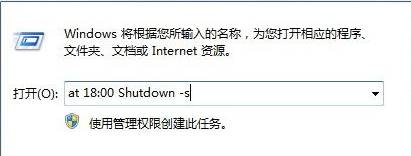
- Win+R → at 22:00 shutdown -s -t 60 → 回車
- 系統提示「已新增工作」,22:00 將倒數 60 秒關機
進階參數說明
| 參數 | 含義 | 範例 |
|---|
-s | 關機 | shutdown -s -t 300 (5 分鐘後關機) |
-r | 重啟 | at 03:00 shutdown -r -f (凌晨 3 點強制重啟) |
-t xxx | 倒數秒數 | shutdown -s -t 0 (立即關機) |
-f | 強制關閉應用 | 防止未儲存文件阻塞關機 |
-a | 取消排程 | shutdown -a (取消待執行關機) |
週期性排程 (每日/工作日)
# 每日 23:00 關機
schtasks /create /sc daily /tn "AutoShutdown" /tr "shutdown -s -f" /st 23:00

# 工作日 18:30 關機
schtasks /create /sc weekdays /tn "WorkdayShutdown" /tr "shutdown -s -f" /st 18:30
方案二:QQ 音樂/播放軟體定時關機
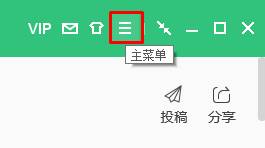
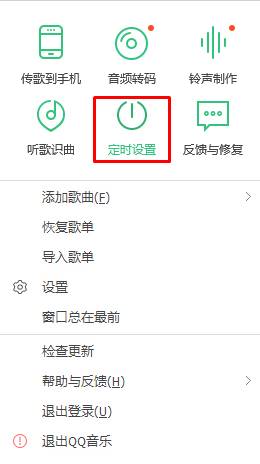
- 開啟 QQ 音樂 → 右上角主選單 → 「定時設定」
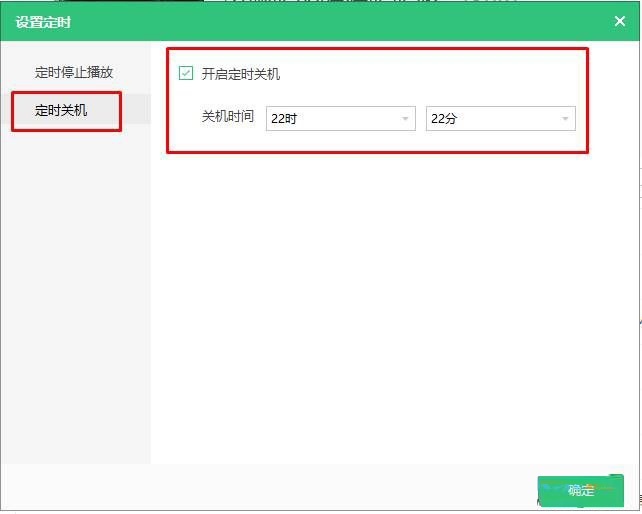
- 選擇「定時關機」 → 勾選「開啟定時關機」
- 設定具體時間 (如 23:30) → 確定
- 軟體名稱:
- QQ 音樂播放器 V12.70 官方正式版
- 軟體大小:
- 49.5 MB
- 更新時間:
- 2016-07-14
其他支援定時關機的常用軟體
- PotPlayer / MPC-BE (視訊播放結束關機)
- 吾壓 / Bandizip (解壓縮完成關機)
- Free Download Manager / IDM (下載完成關機)
- Wise Auto Shutdown / Shutdown Timer (專用定時工具)
取消已設定的自動關機
- 命令法:Win+R → shutdown -a
- 任務排程器:Win+R → taskschd.msc → 任務程式庫 → 刪除對應任務
- 播放軟體:對應軟體設定介面取消勾選