Windows XP Windows 7 Windows 2003 Windows Vista Windows 綜合教學 Linux 系統教學
Windows 10 Windows 8 Windows 2008 Windows NT Windows Server 電腦軟體教學
您现在的位置: Windows教程網 >> Windows教程 >  >> Windows 綜合教學 >> 關於 Windows

Win10 預覽版 14971:PowerShell 取代命令提示字元成預設 Shell,如何改回 cmd?

編輯:關於 Windows

Windows 10 Insider Preview Build 14971 起,微軟將 PowerShell 設為預設命令列 Shell**,取代傳統 cmd.exe。具體表現:Win+X 選單、檔案總管 檔案** 選單、資料夾空白處 Shift+右鍵選單,皆改為 Windows PowerShell** / Windows PowerShell (系統管理員)**。甚至執行 cmd 也會導向 PowerShell。
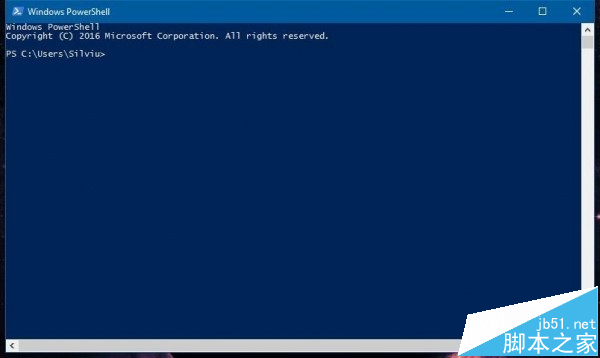
變更內容總覽

  • Win+X 選單**:命令提示字元 → PowerShell / PowerShell (系統管理員)
  • 檔案總管 → 檔案 → 開啟命令提示字元**:改為 PowerShell
  • 資料夾空白處 Shift+右鍵 → 在此處開啟命令視窗**:改為 PowerShell
  • 執行 `cmd`**:自動導向 PowerShell 宿主環境

Win+X 選單顯示 PowerShell

如何改回命令提示字元(cmd)

  1. 設定 → 個人化** → 工作列**。
  2. 找到 「當我以滑鼠右鍵按一下開始按鈕或按下 Windows 標誌鍵 + X 時,用 Windows PowerShell 取代命令提示字元」**。
  3. 將開關切為 「關閉」**。

設定完成後,Win+X 選單、檔案總管選單即恢復顯示「命令提示字元」與「命令提示字元 (系統管理員)」。

微軟立場與未來展望

  • Dona Sarkar (Windows Insider 負責人) 表示:PowerShell 功能更強大(物件導向、管線、遠端管理、跨平台),是未來方向。
  • 傳統 cmd.exe 仍保留於系統中(C:\Windows\System32\cmd.exe),可手動執行,但微軟預計未來版本逐步淘汰。
  • 建議系統管理員、開發者盡早熟悉 PowerShell 核心指令(Get-Process, Get-Service, Invoke-WebRequest 等)。

小結

Build 14971 標誌著 Windows 命令列世代交替的關鍵節點。若你深度依賴 cmd 批次檔、舊版工具鏈,請立即在設定中關閉「以 PowerShell 取代命令提示字元」,爭取遷移緩衝期;長遠來看,投資 PowerShell 技能將是必然選擇。

Copyright © Windows教程網 All Rights Reserved