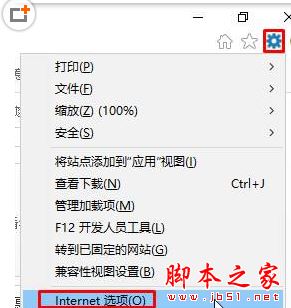
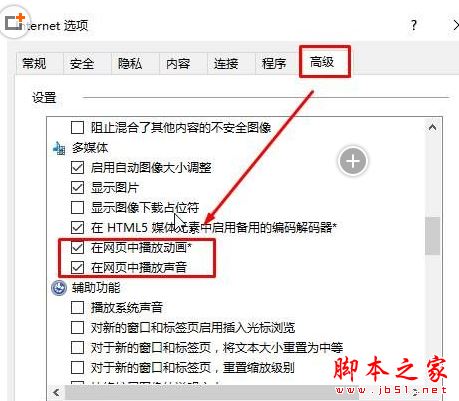
IE 11 網頁靜音修復:IE → 設定 (齒輪) → 網際網路選項 → 進階索引標籤 → 設定清單勾選「在網頁中播放聲音」 → 套用確定。聲音即刻恢復,適用 Win10 內建 IE。
Build 10100 現身內測:Win10 版本號跳躍為 Build 2015 大會準備?
微軟發布 Windows 10 升級指引影片:你的免費升級在哪裡?
Win8.1 安裝過程出現預約 Win10 升級提示,重灌也會觸發
Windows 7 印表機刪除後自動復活?徹底移除驅動程式才能根治
Win10 企业版 90 天评估版 ISO 下载(中/英 32/64位)附 SHA1 校验
Win10 激活失敗 0xC004C003?官方說法:耐心等待伺服器恢復
Win10 能否拯救微軟移動雄心?從 Zune 失敗到 Continuum 翻盤關鍵
Win7 旗艦版重裝 TCP/IP 協定恢復網路連線