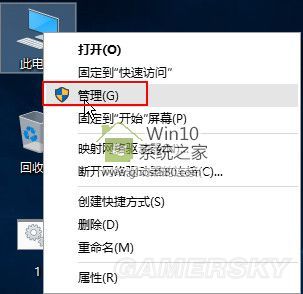
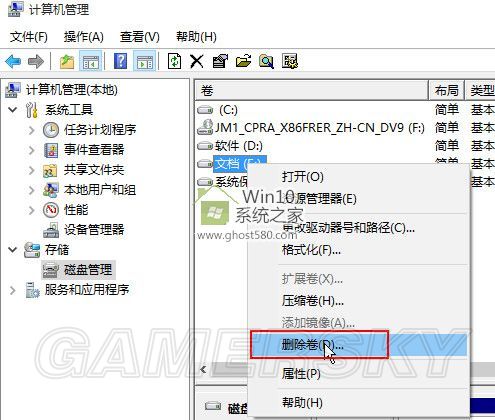
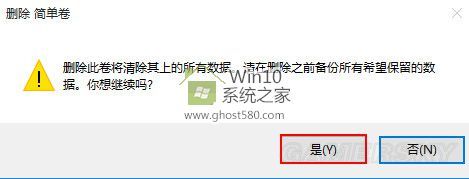
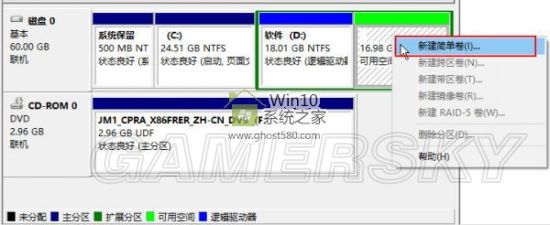
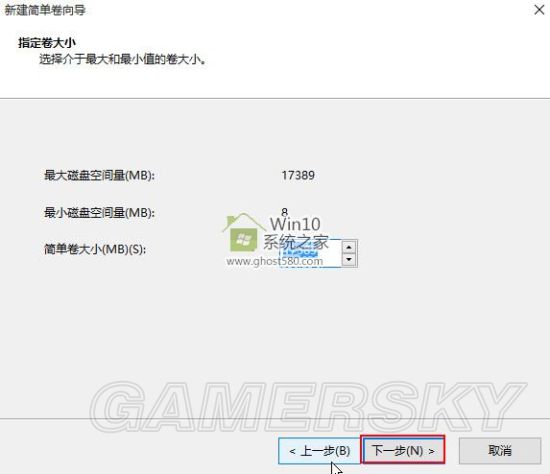
Win10 格式化磁碟失敗,可用磁碟管理工具刪除卷再重建簡單磁碟區解決。
刪除重建可清除檔案系統錯誤,解決無法格式化問題(資料會遺失,操作前請備份)。
Windows 8 遠端桌面被防火牆阻擋?開啟防火牆例外規則解決
Win7 關閉資料夾共用防資安風險:進階共用取消勾選即可
Win10 設置圖片密碼 (圖片解鎖) :三點手勢替代傳統密碼圖文教程
Win10 微軟拼音輸入法設定預設輸入模式為英文:設定 App → 時間與語言 → 區域與語言 → 選項 → IME 預設模式
升級 Win10 後藍屏死機?完整診斷與修復指南
Win10 Snap 分割螢幕功能:拖曳視窗至四角實現 2/3/4 分割、自訂比例
微軟鎖定 6 月釋出 Windows 10 RTM,搶攻開學季商機
Win7開機黑屏提示「Windows無法啟動 \System32\Config\System」:故障修復控制台登錄檔重建完整流程