Windows XP Windows 7 Windows 2003 Windows Vista Windows 綜合教學 Linux 系統教學
Windows 10 Windows 8 Windows 2008 Windows NT Windows Server 電腦軟體教學
您现在的位置: Windows教程網 >> Windows教程 >  >> Windows 綜合教學 >> 關於 Windows

Win10 如何強制使用者定期變更密碼?三種方法完整教學

編輯:關於 Windows

密碼長期不換風險極高,Win10 提供三種方式強制定期更新:

方法一:群組原則(專業版/企業版/教育版適用)

  1. Win 搜尋 gpedit.msc 開啟編輯器。
  2. 定位:電腦設定 → Windows 設定 → 安全性設定 → 帳戶原則 → 密碼原則。
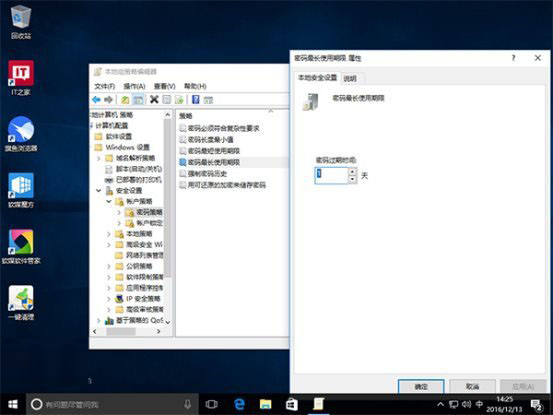
  3. 設定「密碼最長使用期限」(建議 72 天,0 代表永不過期)。
  4. 可同步設定最短使用期限、長度、複雜度、歷程記錄記憶數。

方法二:命令提示字元(家庭版/快速設定適用)

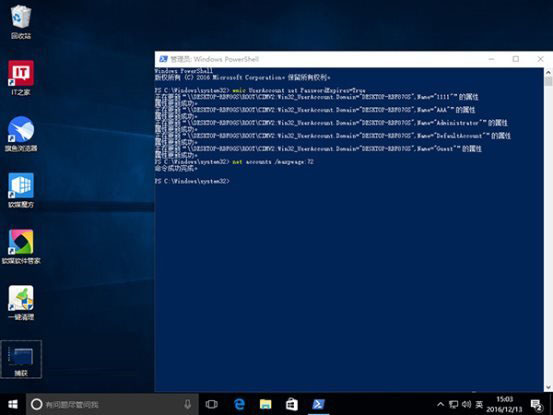
  1. 管理員身分開啟 CMD 或 PowerShell。
  2. 強制密碼過期:wmic UserAccount set PasswordExpires=True
  3. 設定最大密碼齡:net accounts /maxpwage:天數(X 為天數)。
  4. 指定單一用戶:wmic UserAccount where Name='使用者名稱' set PasswordExpires=True
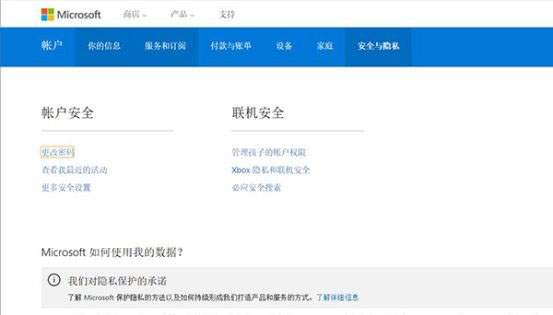
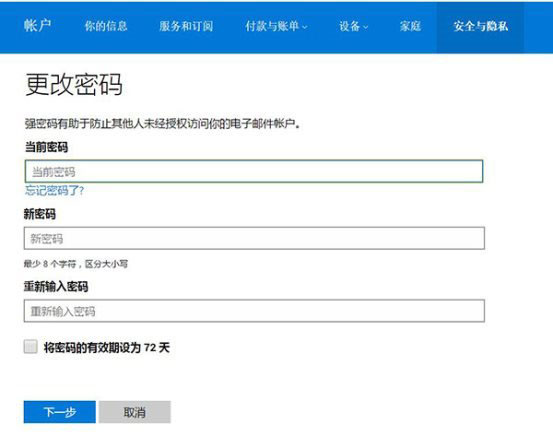
方法三:Microsoft 帳戶線上設定

  1. 登入 Microsoft 官網 → 帳戶資訊 →「安全性與隱私」。
  2. 選「變更密碼」→ 勾選「將密碼有效期設為 72 天」。

注意:Microsoft 帳戶僅支援固定 72 天,變更後所有關聯服務 (Office、Skype、OneDrive 等) 需重新登入。建議依版本選擇適合方式,養成定期換密習慣。

Copyright © Windows教程網 All Rights Reserved