Windows 遠端協助雖方便他人遠端協助解決問題,但平時不需使用時應關閉,防止惡意入侵。同理關閉遠端桌面連線。
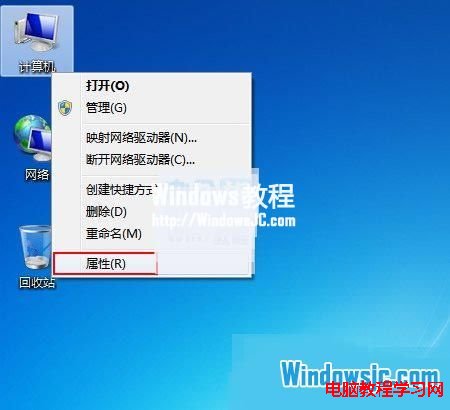
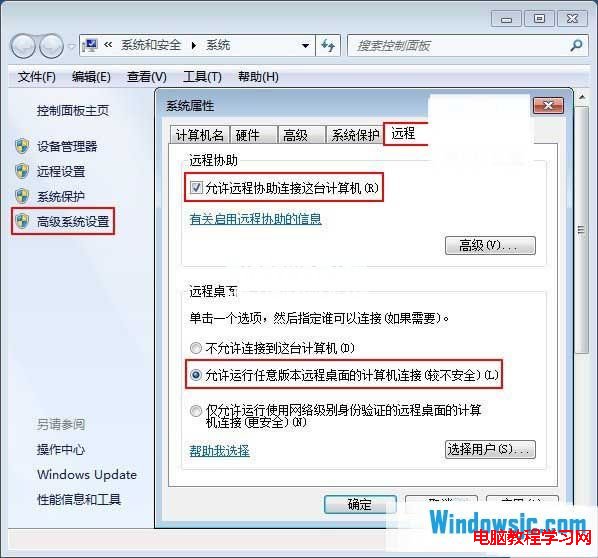
1、右鍵「電腦」→「內容」→ 左側「進階系統設定」→「遠端」分頁。
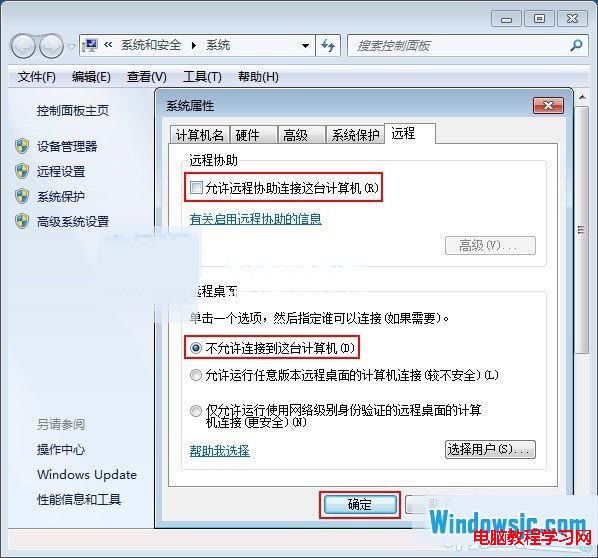
2、取消勾選「允許遠端協助連線這台電腦」。
3、遠端桌面選擇「不允許連線到這台電腦」。
Win10 免費升級 7/29 截止,之後授權 770 元起:免費期倒數與付費版本價格說明
Windows 7 工作列圖示大小切換教學:大圖示與小圖示模式一鍵切換
Windows 7 共用印表機無法存取?兩大常見原因與解決方案
下載 ISO 映像檔如何安裝 Windows 10?掛載 ISO 直接升級與製作 USB 開機隨身碟完整教學
Win10 顯示檔案副檔名的兩種方法(資料夾選項 / 檢視分頁)
Win10 累積更新機制:重灌系統免煩惱一堆補丁
Win10 chkdsk 指令完整參數大全:經典與新增功能一次掌握
Windows 10 圖示顯示異常/空白?手動重建 IconCache.db 快取修復