在 Windows 7 下若驅動程式安裝不正確,透過裝置管理員往往找不到印表機裝置,導致無法徹底移除。此時需透過「裝置和印表機」的伺服器屬性來刪除驅動程式套件。
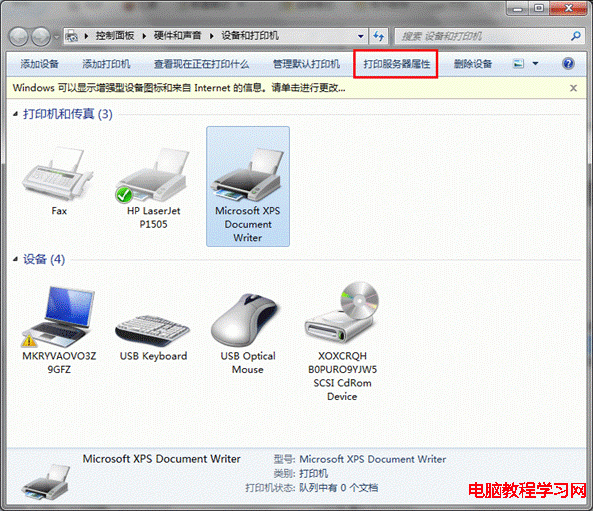
1、開啟「開始」→「裝置和印表機」,任意選取一個印表機圖示 → 右鍵選擇「印表機伺服器屬性」。
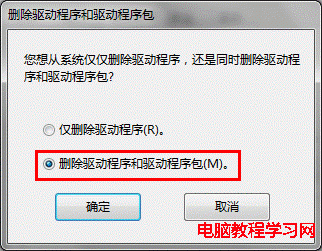
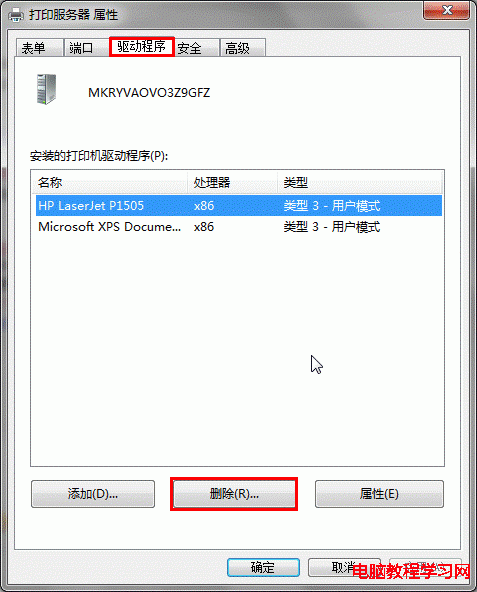
2、切換至「驅動程式」分頁,選取欲移除的驅動程式 → 點選「移除」 → 選擇「移除驅動程式和驅動程式套件」 → 確定。
3、若無法移除:開啟服務管理員停止「Print Spooler」服務 → 刪除 C:\Windows\System32\spool\PRINTERS 目錄下所有檔案 → 重新啟動 Print Spooler 服務 → 再執行步驟 2 即可成功移除。