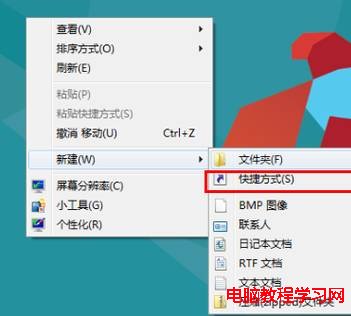
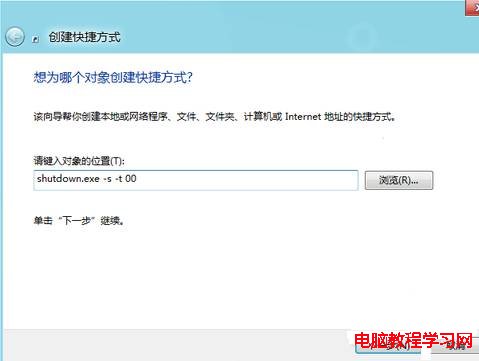
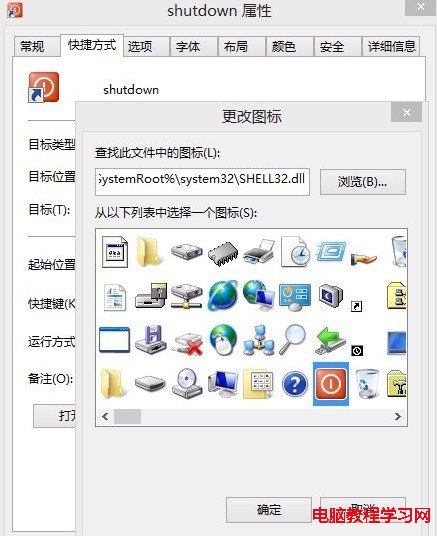
Windows 8 關機需經 Charms 列多步驟,建立 shutdown.exe 捷徑並釘選到工作列/開始畫面,實現真正一鍵關機。
shutdown.exe
shutdown.exe -s -t 00
shutdown.exe -r -t 00
shutdown.exe -l
提醒:捷徑放置位置勿過於顯眼,避免誤觸關機。Alt+F4 (桌面) 亦可快速呼叫關機對話框。
Win7 原始帳號無法修改密碼?取消「使用者無法變更密碼」限制
Win10 藍畫面提示 ACPI.sys 失敗?更新電源管理驅動程式解決
Win10 開機密碼設定/取消/變更完整教學:控制台與設定雙管道操作
Win7/Win8.1 升級 Win10 失敗報錯 80240020?一鍵修改登錄鍵值 AllowOSUpgrade=1 秒解決
Windows 8 學生開發者帳號註冊完整流程圖文教學
Win10 內建郵件應用程式設定與使用完整教學:支援 Outlook、Gmail、QQ 等多種帳號
Windows 7 恢復視窗動態縮放效果:開啟「最大化/最小化時動態顯示視窗」讓切換更直觀
Win10 隱藏圖示找不到了?檔案總管「檢視」勾選「隱藏的項目」找回教學