安裝軟體時常未經同意塞進 IE 右鍵選單,久而久之選單冗長難用。可透過登錄表直接刪除對應鍵值,乾淨俐落。
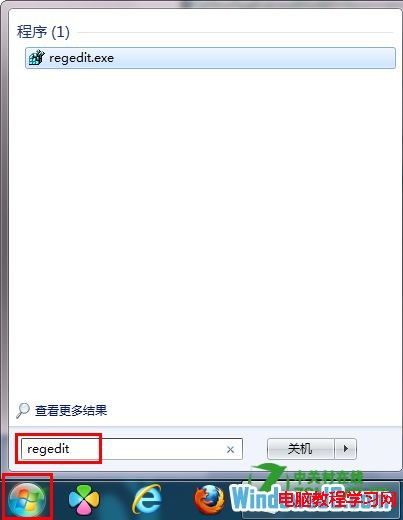
regedit
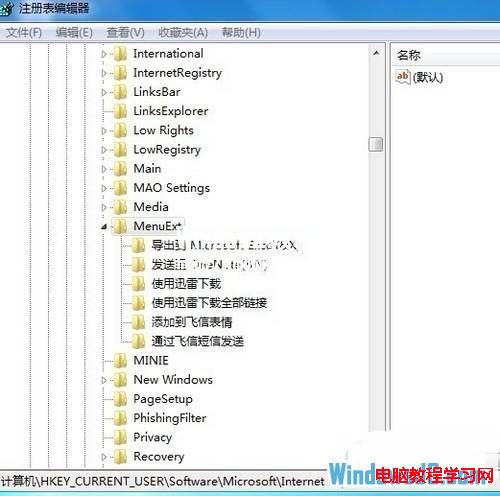
HKEY_CURRENT_USER\Software\Microsoft\Internet Explorer\MenuExt
刪除後重新開啟 IE,右鍵選單即恢復清爽。操作前建議匯出該分支備份。
Win10 正式版前核心應用更新了哪些內容?郵件、鬧鐘、計算機等批量修復
Win7 系統激活工具使用教學:以管理員身分執行一鍵激活
Win10 開啟本機群組原則編輯器兩大法(搜尋 / 執行指令)
Windows Server 2008 IIS 7 驗證碼無法顯示?啟用 ASP「啟用父路徑」即可解決
Win10 快速存取釘選資料夾:一鍵固定常用深層目錄到快速存取與檔案選單
Win7 桌面圖示有黑框/黑邊?重建圖示快取(IconCache.db)一鍵修復
Windows 8.1 內建掃描功能在哪裡?透過「裝置和印表機」使用印表機掃描文件/圖片
Mac 連不上 Wi-Fi 解決方法:刪除 Bluetooth 偏好設定檔