SkyDrive(現稱 OneDrive)是微軟提供的雲端儲存服務,Win8.1 內建整合,登入 Microsoft 帳號即可同步檔案。但預設儲存路徑通常在系統碟,若想將同步資料夾移至其他磁碟分區,操作如下:
1. 開啟 SkyDrive 屬性
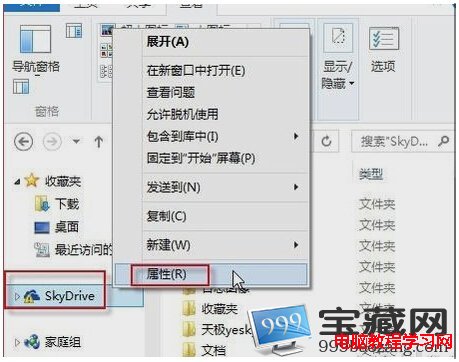
於檔案總管左側導覽列,右鍵點擊 SkyDrive 圖示 → 選擇「內容」。
2. 變更儲存路徑
切換至「位置」索引標籤 → 在位址列輸入新路徑,或點擊「移動」按鈕瀏覽選取資料夾 → 按「確定」。

3. 確認移動檔案
系統詢問是否移動現有檔案,選擇「是」 → 等待移動完成即可。

完成後,SkyDrive 同步資料夾即已遷移至指定位置,不再佔用系統碟空間。