Windows XP Windows 7 Windows 2003 Windows Vista Windows 綜合教學 Linux 系統教學
Windows 10 Windows 8 Windows 2008 Windows NT Windows Server 電腦軟體教學
您现在的位置: Windows教程網 >> Windows教程 >  >> Windows 綜合教學 >> 關於 Windows

Windows 7 自訂輸入法圖示:打造專屬任務列圖標

編輯:關於 Windows

Windows 7 內建輸入法指示器圖示單調,可透過「文字服務和輸入語言」設定更換為個人喜好的圖示(.ico/.bmp/.png),打造獨特任務列風格。

操作步驟

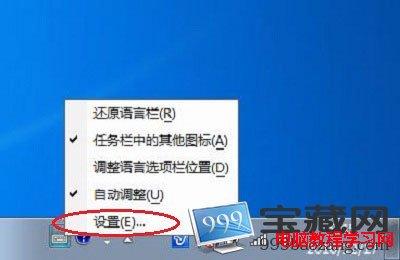
  1. 右鍵任務列輸入法指示器 → 「設定」。
  2. 在「文字服務和輸入語言」視窗,選取「中文 (簡體) - 美式鍵盤」 → 點選右側「內容」。
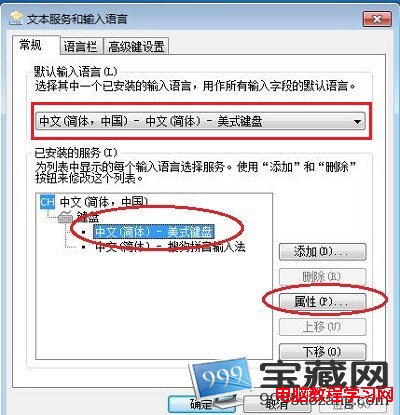
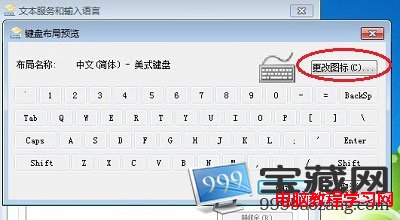
  3. 在「鍵盤版面預覽」視窗點選「變更圖示」。
  4. 從系統圖示庫選擇,或點選「瀏覽」指定自訂 .ico/.bmp/.png 檔案,一路確定套用。
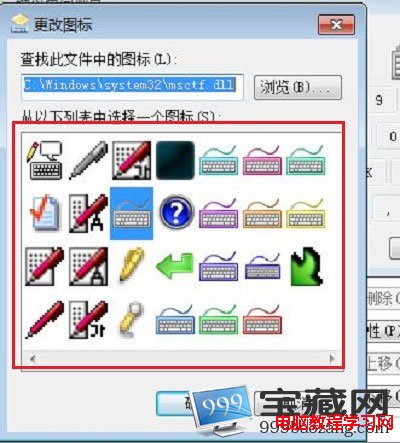
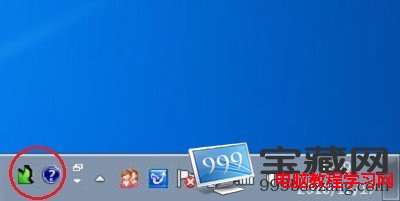
更換後任務列輸入法指示器即顯示新圖示,不影響輸入法功能。同樣方法可更換其他已安裝輸入法的圖示。

Copyright © Windows教程網 All Rights Reserved