Windows 7 旗艦版引入 Aero Shake:搖動視窗可最小化其他視窗。許多使用者習慣使用 Win + D 等熱鍵,Aero Shake 反而干擾操作。透過群組原則可徹底停用此功能,並可節省系統資源。
1. 按 Win + R 輸入 gpedit.msc 開啟群組原則編輯器。依序展開:
「使用者設定」 → 「系統管理範本」 → 「桌面」。
2. 在右側找到「關閉 Aero Shake 視窗最小化滑鼠手勢」 → 雙擊開啟。
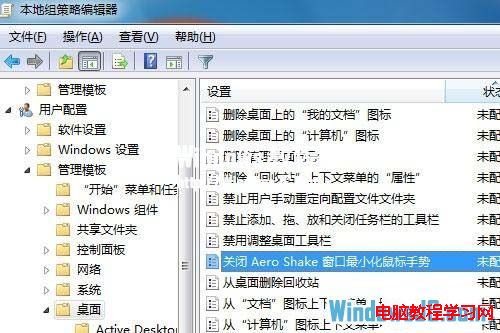
3. 選擇「已啟用」 → 「確定」套用並關閉。
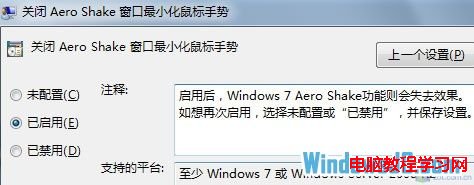
注意:此設定僅適用於 Windows 7 與 Windows Server 2008 R2,Windows Vista 不支援。
淺談 Windows Server 2008 實戰心得:Hyper-V、Server Core、安全強化與管理革新
Win7 註冊表恢復誤刪回收筒圖示:HideDesktopIcons 鍵值歸零
UEFI+GPT 模式安裝 Win7 系統完整圖文教學 (含 BIOS 設定、分區、驅動)
Win10 玩《極限競速 6》閃屏?更新顯卡驅動、設高效能模式、插電源、降解析度/畫質、回報 Beta 反饋五大方案
Windows 10 隱藏登入介面啟用教學:註冊表修改 Threshold 鍵值
Windows 7 刪除多餘使用者帳號:控制台移除帳戶並選擇保留/刪除個人檔案