Win7 預設 DPI 96 px(100%),在 24-30 吋高解析度螢幕(1920×1200、2560×1600)上字體極小,長時間閱讀傷眼。透過「放大或縮小文字與其他項目」調整 DPI 至 125% 或 150%,即可獲得舒適字體大小。
操作步驟
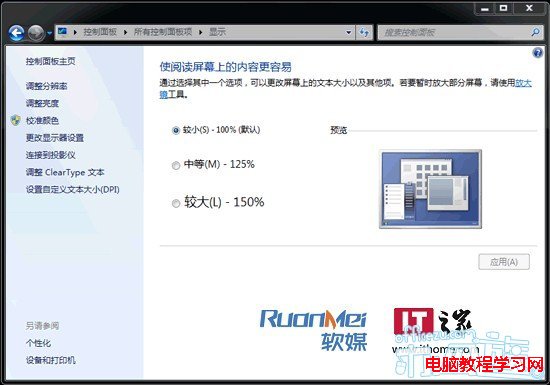
- 桌面右鍵 →「螢幕解析度」→「放大或縮小文字與其他項目」。
- 或 Win 鍵搜尋「DPI」→ 選「放大或縮小文字與其他項目」。
- 選擇「中等 - 125%」或「較大 - 150%」→「套用」→ 登出/重新登入生效。
補充
- 125% 適合 24 吋 1920×1080/1200;150% 適合 27-30 吋 2560×1440/1600。
- 部分舊版軟體在高 DPI 下介面會模糊,可在相容性頁籤勾選「在高 DPI 設定下停用顯示縮放」。