想將開機光碟、音樂 CD、DVD 電影原汁原味備份分享?直接複製檔案會遺失開機區、軌道資訊。唯有製作 ISO 映像檔才能完整保留。魔方內建的「魔方刻錄」(BurnMaster.exe,僅 240 KB 綠色免安裝)三步驟即可完成。
BurnMaster.exe。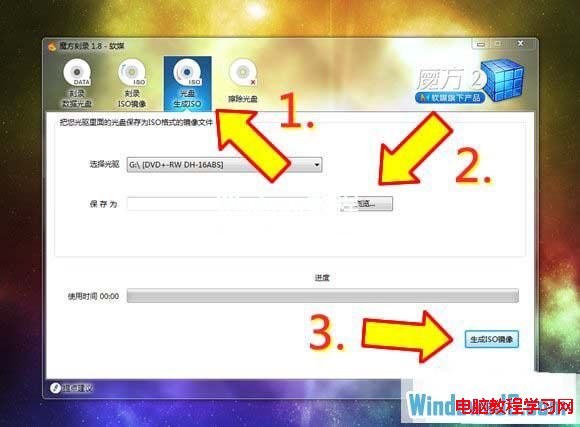
Windows 8 更新 KB2770917 失敗解決方案:清理啟動服務法
Windows 7 關閉休眠功能教學:用 .bat 指令一鍵禁用 hiberfil.sys
Win10 桌面背景設定兩大法:右鍵圖片直接設定 / 個人化精細調整填充模式
Win10 Emoji 「便便」表情為何不笑?微軟遵循 Unicode 標準定義不加笑臉
Win10 TH2 Build 10586 更新升級完整指引:版本鎖定、推送時程、安裝方式
Win10 Mobile 10136 已修復問題大全:MMS Bug、鎖定畫面觸控、通知中心展開、人脈字體、Wi-Fi 快速切換、開始畫面縮放、鎖定畫面詳細狀態、返回鍵游標