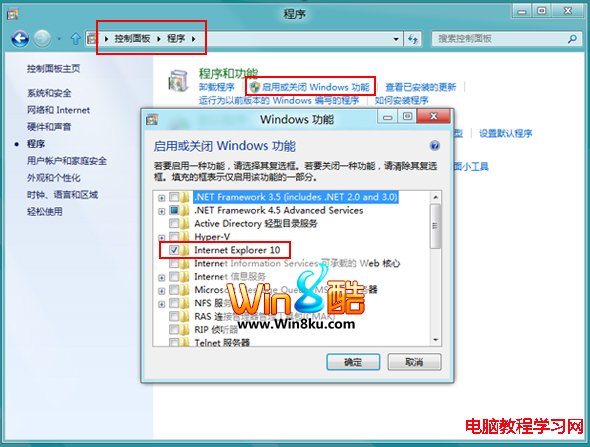
Windows 8 預設 IE10 為預設瀏覽器,安裝 Chrome/Firefox 後若無法變更預設,可透過「關閉 Windows 功能」停用 IE10:Win+X → 控制台 → 程式 → 「開啟或關閉 Windows 功能」 → 取消勾選「Internet Explorer 10」 → 確定 → 重開機 → 再安裝/設定其他瀏覽器為預設。注意此法僅停用 IE10 不會移除核心元件,系統相依功能不受影響。
Win10 免費升級 7/29 截止,之後授權 770 元起:免費期倒數與付費版本價格說明
Win8/8.1 安裝語言包完整教學:新增介面語言與輸入法
Win8應用商店打不開?重命名SoftwareDistribution資料夾與修改DNS雙管齊下
Windows 7 突然卡機死當 三大常見成因與排查方向
Windows 10 安裝失敗且無任何錯誤提示?可能是加密軟體導致,卸載後即可解決
Win8.1 靠邊顯示(貼靠)視窗大小調整:左/右靠邊、拖曳分割線任意比例
Windows 批量複製指定文件的實用技巧:使用批處理腳本輕鬆搞定
Windows 10 內建地圖 App 追蹤聖誕老人位置:Where's Santa 功能體驗