Windows XP Windows 7 Windows 2003 Windows Vista Windows 綜合教學 Linux 系統教學
Windows 10 Windows 8 Windows 2008 Windows NT Windows Server 電腦軟體教學
您现在的位置: Windows教程網 >> Windows教程 >  >> Windows 綜合教學 >> 關於 Windows

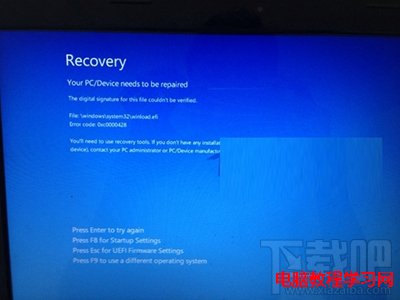
Win10 開機藍屏 Recovery「您的裝置需要修復」:唯有重裝系統解決

編輯:關於 Windows

Windows 10 開機出現 Recovery 藍屏畫面,提示 「Your PC/Device needs to be repaired」 (您的電腦/裝置需要修復),錯誤碼常為 0xc000000f、0xc0000225 等,代表開機設定資料 (BCD) 或系統核心檔案損毀,通常發生於版本升級 (如 1909→2004) 過程中斷、驅動衝突、磁碟錯誤。
嘗試修復 (成功率低)

  1. 進入 WinRE (復原環境) → 「疑難排解」→「進階選項」→「啟動修復」。
  2. 命令提示字元執行:
    bootrec /scanos
    bootrec /fixmbr
    bootrec /fixboot
    bootrec /rebuildbcd
  3. sfc /scannow /offlinebootdir=C:\ /offlinewindir=C:\Windows (離線掃描)。

根本解決:重裝系統

實測上述修復成功率極低,且即便修復成功,系統穩定性仍存疑。建議:

  1. 備份重要資料 (可用 WinPE、Linux Live USB 掛載磁碟複製)。
  2. 下載最新版 Windows 10 官方 ISO (Microsoft 官網 Media Creation Tool)。
  3. 製作 USB 開機安裝碟,乾淨安裝 (格式化系統碟)。
  4. 安裝最新驅動、更新、常用軟體。
避坑指南:重大版本升級前務必備份資料、建立系統還原點、確認磁碟健康 (CrystalDiskInfo)、關閉第三方防毒軟體。若硬體較舊,建議維持在穩定的 LTSC/LTS 版本或不再升級大版本。

Copyright © Windows教程網 All Rights Reserved