Windows XP Windows 7 Windows 2003 Windows Vista Windows 綜合教學 Linux 系統教學
Windows 10 Windows 8 Windows 2008 Windows NT Windows Server 電腦軟體教學
您现在的位置: Windows教程網 >> Windows教程 >  >> Windows 綜合教學 >> 關於 Windows

Windows XP 開始選單關機按鈕消失?群組原則恢復顯示教學

編輯:關於 Windows

Windows XP 開始選單的「關機」按鈕若突然消失,通常是群組原則「移除並禁止存取關機命令」被啟用所致。透過 gpedit.msc 將其設為「未設定」即可恢復。以下為操作步驟。

恢復步驟

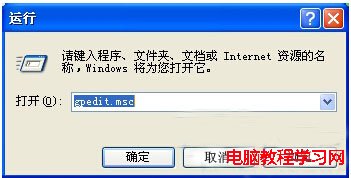
  1. 按 Win+R 輸入 gpedit.msc 開啟「群組原則編輯器」。
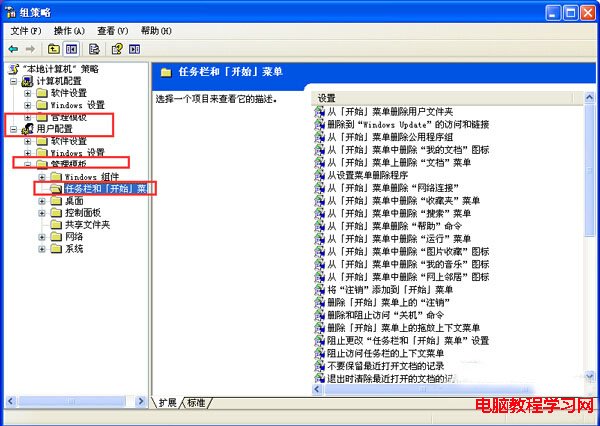
  2. 依序展開:
    「使用者設定」→「系統管理範本」→「開始功能表和工作列」。
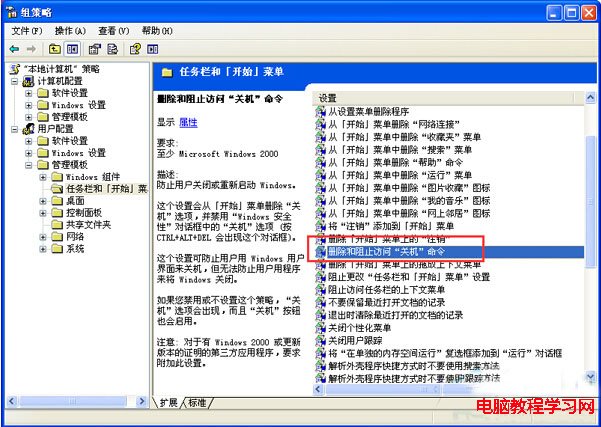
  3. 在右側清單找到「移除並禁止存取關機命令」,雙擊開啟。
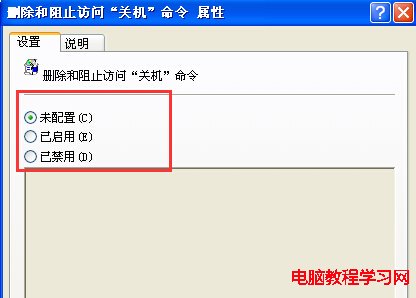
  4. 選擇「未設定」→ 「確定」。
  5. 關閉群組原則編輯器,重新登入或重新開機即可看到關機按鈕。

開啟 gpedit.msc

使用者設定-系統管理範本-開始功能表和工作列

移除並禁止存取關機命令

設為未設定

補充說明

  • 此原則亦會影響「關機」、「重新開機」、「待機」、「休眠」等所有電源命令在開始選單的顯示。
  • 若為家用版 Windows XP,無 gpedit.msc,可改用登錄修改:
    HKEY_CURRENT_USER\Software\Microsoft\Windows\CurrentVersion\Policies\Explorer\NoClose 設為 0 或刪除該值。
  • 同樣路徑下的「移除並禁止存取關機命令」對應登錄值為 NoClose。

快速恢復關機按鈕,避免只能強制斷電關機。

Copyright © Windows教程網 All Rights Reserved