Win10 內建語音助理「小娜」(Cortana),若呼喚「你好小娜」無反應,通常是語音喚醒功能未開啟。以下步驟教您快速啟用:
點擊工作列搜尋欄,再點擊右側的「設定」齒輪圖示。
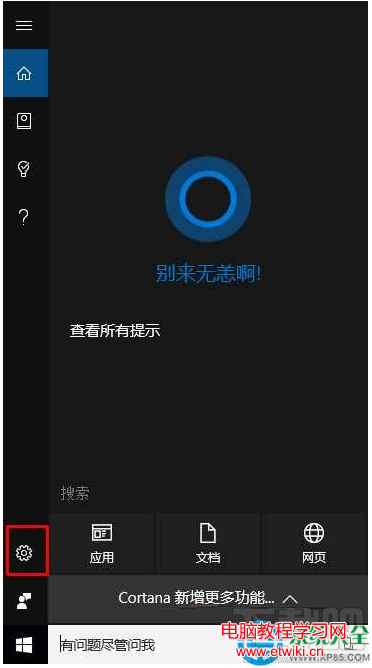
在設定頁面中,找到「讓 Cortana 回應『你好小娜』」選項,將開關切換為「開啟」。
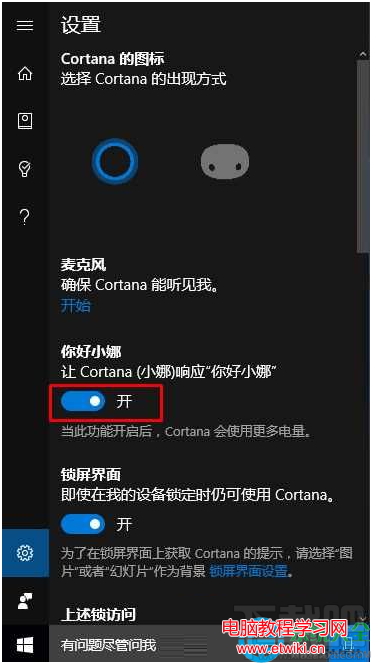
完成後,對著麥克風說「你好小娜」,Cortana 即會喚醒聆聽指令。若仍無反應,請檢查麥克風權限與語音辨識語言設定。
Win10 內建「免打擾時段」即遊戲模式:一鍵靜音通知、排程自動開關、僅限 Modern App 生效
Windows 32 位元與 64 位元差異深度解析:記憶體、效能、相容性一次懂
徹底移除「取得 Windows 10」圖示:三種關閉 GWX 推送的方法
Win10 升級逾 30 天仍可無痛降級:保留 Windows.old 與 $Windows.~BT 資料夾關鍵技巧
你升級 Windows 10 了嗎?Win7 升級體驗問卷調查啟動,結果將回饋微軟
Win10 Build 10135 上手體驗圖集 (30 張) :RTM 預覽版已近在咫尺