Win7/8.1 右下角常駐「取得 Windows 10」圖示(GWX.exe)讓許多使用者困擾。本文提供永久移除、暫時關閉、工具一鍵三種方案。
方法一:I Don't Want Windows 10 一鍵淨化(推薦)
- 下載並執行 I Don't Want Windows 10。
- 點擊「I Agree」,工具自動移除 KB3035583、停用 GWX 排程、修改登錄檔。
- 重開機即見圖示消失。
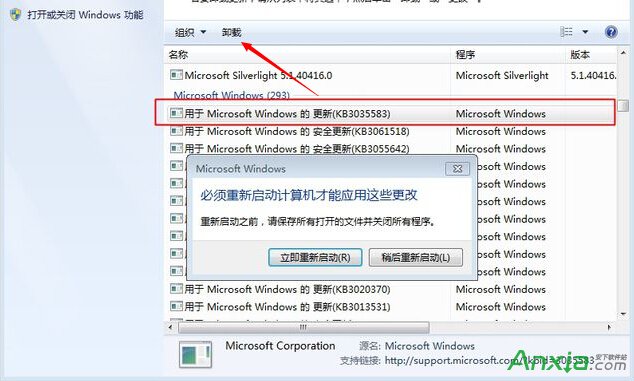
方法二:手動徹底移除
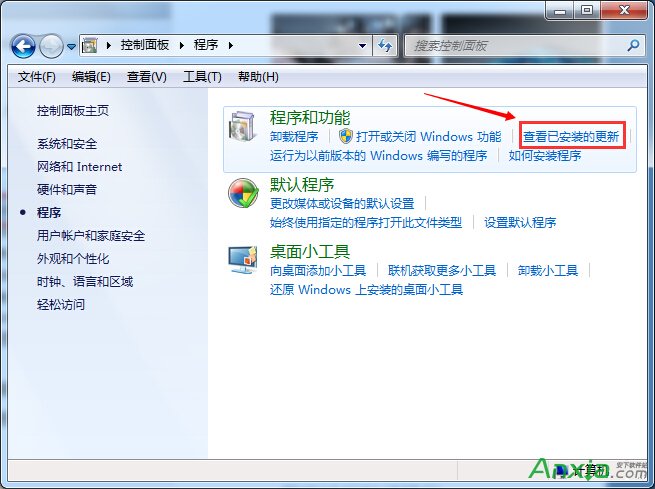
- 「控制台」→「程式和功能」→「檢視已安裝的更新」→ 解除安裝 KB3035583。
- Windows Update 改為「檢查更新但讓我選擇」,或隱藏 KB3035583。
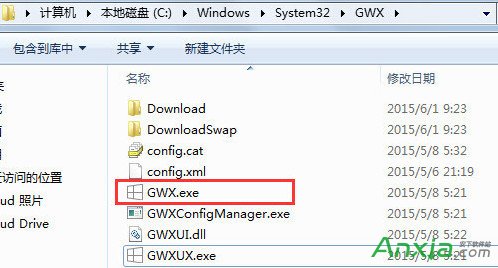
- 刪除
C:\Windows\System32\GWX 資料夾(需取得權限)。
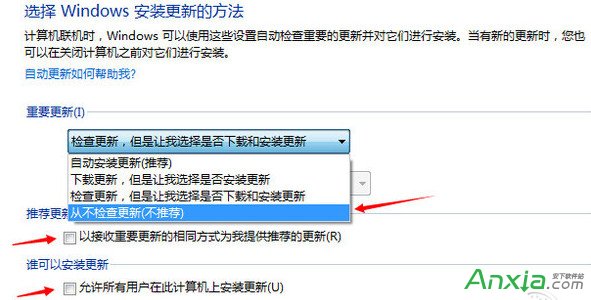
方法三:暫時關閉(重開機失效)
工作管理員(Ctrl+Shift+Esc)→ 找到 GWX.exe → 右鍵「結束工作」,圖示即時消失。
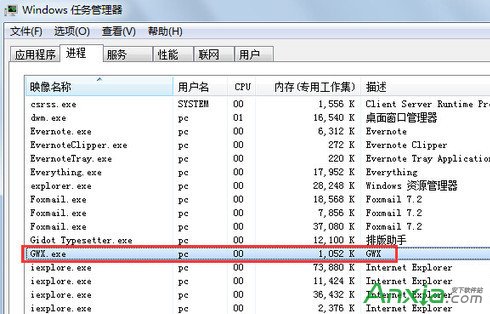
建議:長期不升級請採用方法一或二;臨時不想看圖示用方法三。