Windows XP Windows 7 Windows 2003 Windows Vista Windows 綜合教學 Linux 系統教學
Windows 10 Windows 8 Windows 2008 Windows NT Windows Server 電腦軟體教學
您现在的位置: Windows教程網 >> Windows教程 >  >> Windows 綜合教學 >> 關於 Windows

Windows 7修改預設桌面路徑兩種方法:註冊表與圖形介面

編輯:關於 Windows

為避免重裝系統導致桌面檔案遺失,可將桌面資料夾移至非系統碟。提供兩種修改方式:

方法一:修改註冊表

  1. Win+R輸入regedit開啟註冊表編輯器。
  2. 依序展開並修改以下兩個路徑中Desktop的數值資料為新路徑(如D:\Desktop):
    HKEY_CURRENT_USER\Software\Microsoft\Windows\CurrentVersion\Explorer\Shell Folders
    HKEY_CURRENT_USER\Software\Microsoft\Windows\CurrentVersion\Explorer\User Shell Folders

方法二:圖形介面操作(建議)

  1. 開啟檔案總管,瀏覽至C:\Users\用戶名\Desktop。
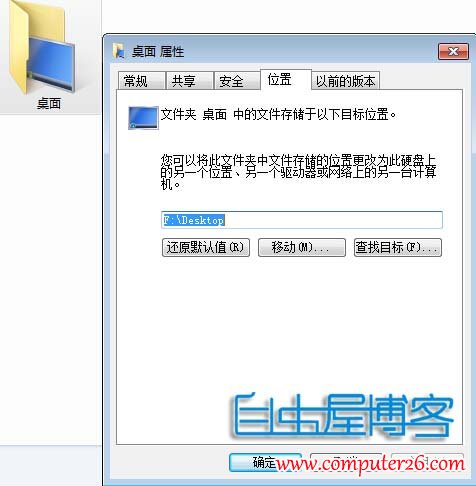
  2. 右鍵「桌面」資料夾 → 「內容」 → 「位置」分頁。
  3. 點擊「移動」,選擇新路徑(如D:\Desktop) → 「確定」 → 詢問是否移動現有檔案選「是」。

桌面資料夾位置移動

完成後建議重新啟動電腦確保生效。

Copyright © Windows教程網 All Rights Reserved