忘記 Windows 7 開機密碼,可製作 USB 開機碟進入 PE 系統破解:
操作流程
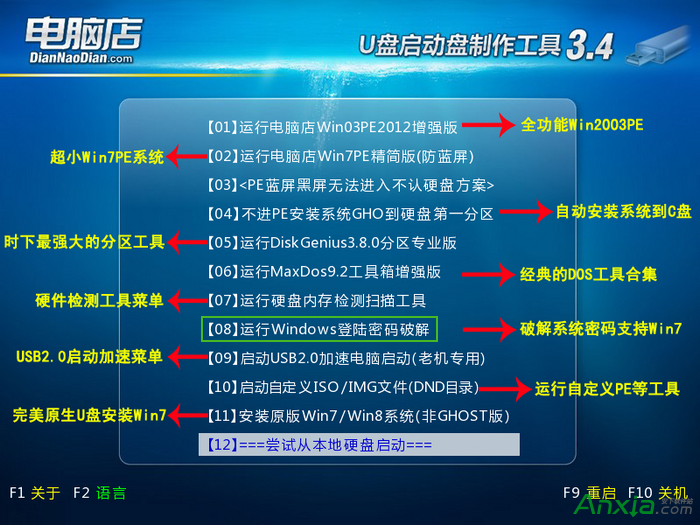
- 使用「電腦店」等工具製作可開機 USB 隨身碟 (含 PE 系統)。
- 關機插入 USB,設定 BIOS 從 USB 開機 (參考筆電/電腦 USB 開機設定教學)。
- 進入 PE 選單選擇「執行 Windows 登入密碼破解」。
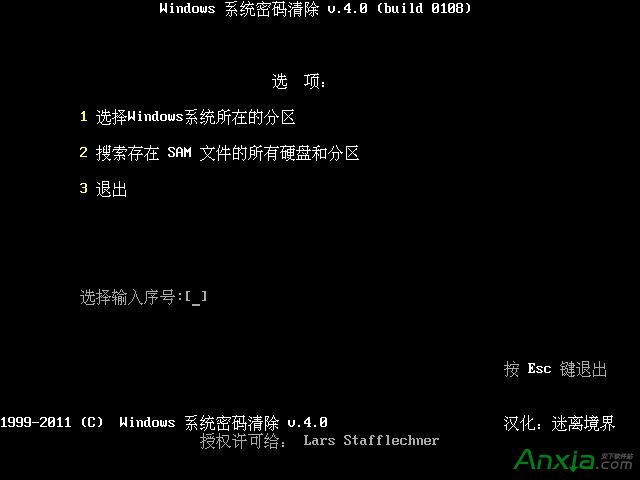
- 開啟「Windows 系統密碼清除工具」,建議選「搜尋存在 SAM 檔案的所有硬碟與分區」。
- 找到 SAM 檔案後按 Enter,選擇要破解的帳戶 (通常為 Administrator),序號填
0。
- 確認提示輸入
Y 執行清除。
- 顯示成功訊息後重啟電腦,即可無密碼登入系統。
重要提醒:
- 僅適用於自己的電腦或經授權的裝置,非法破解他人密碼屬違法行為。
- 破解後建議立即設定新密碼,並檢查系統是否有異常軟體/後門。
- BitLocker 加密磁碟、UEFI 安全開機環境可能導致此法失效。
USB PE 破解密碼是忘記密碼時的救命稻草,但請合法合規使用。