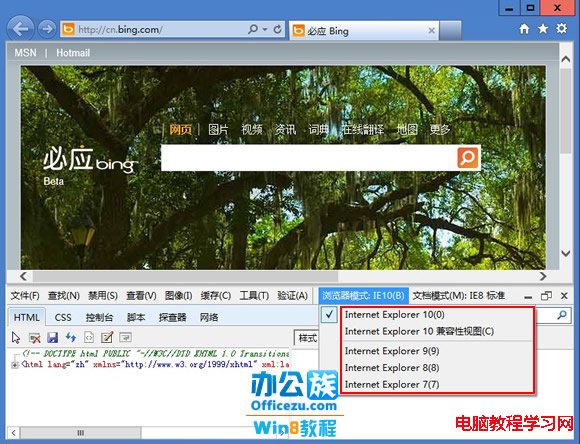
Windows 8 內建 IE10 相容性較差,為因應舊版網頁,微軟整合了 IE9、IE8、IE7 多種瀏覽模式。以下教您快速切換相容性檢視模式:
提示:若不習慣 IE10,也可自行安裝 Chrome、Firefox 等第三方瀏覽器獲得更好相容體驗。
Win7 開始選單「所有程式」不見了?透過群組原則快速修復
Win10 磁盘 100% 占用解决大全:16 招从关闭家庭组到上 SSD 彻底治愈
Win10 PIN 碼登入無法使用?啟用 IPsec Policy Agent 服務即可修復
Win10 Build 10041 如何啟用 Spartan 瀏覽器渲染引擎?IE11 about:flags 實驗功能開啟教學
Windows 10 技術預覽版深度評測:免費升級、Spartan 瀏覽器、Cortana 整合三大亮點
Win7 內建 sxstrace.exe 診斷 Side-by-Side 組件錯誤,完整圖文教學
Win7 IE 暫存檔案完整管理:大小限制、儲存位置移動、保留天數設定
Win10 無線網路每隔幾分鐘卡死?重裝無線網卡驅動+關閉省電解決