Win7 資源管理器地址列會記錄輸入過的路徑,若不想讓他人看到瀏覽歷史,可透過註冊表清除 TypedPaths 機碼下的記錄值。
regedit 開啟註冊表編輯器。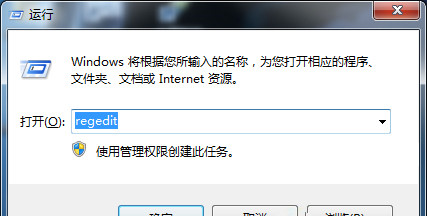
HKEY_CURRENT_USER → Software → Microsoft → Windows → CurrentVersion → Explorer → TypedPaths。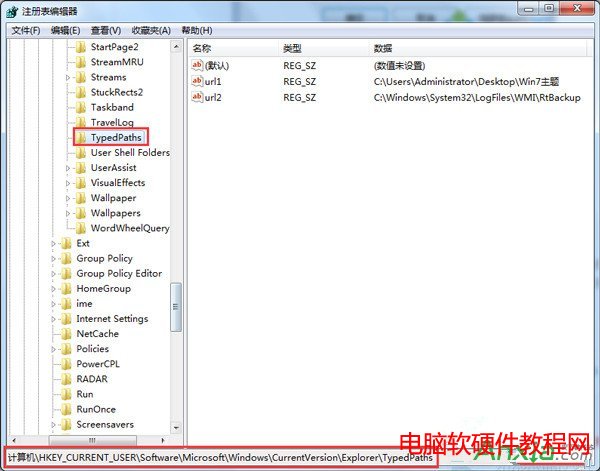
url1、url2... 的字串值,按 Delete 刪除(或右鍵選擇「刪除」)。explorer.exe 或重開機,地址列歷史即被清空。補充:若需保留部分常用路徑,可僅刪除特定值。此外,也可在資源管理器「工具」→「資料夾選項」→「一般」分頁點擊「清除」按鈕清除檔案總管歷史(Win7 需在「檢視」分頁勾選「顯示隱藏檔案」後才能看到此選項)。
Win10 一週年更新 6 月 Bug 大掃除活動下周啟動 微軟集中修復高呼聲問題
Windows 7 雙系統安裝 Windows 10 完整圖文教學(USB 開機安裝法)
Win 7 旗艦版升級 Win 10 錯誤代碼 C1900107 解決方法:移除第三方安全軟體、更新驅動程式
Win7右下角網路圖示不停轉圈?兩招快速解決「小電腦」狂轉問題
Win10 如何將傳統「Windows 相片檢視器」設為預設開啟方式?登錄修改法完整教學
Win10 新增「微軟列印至 PDF 設定」應用:支援密碼加密、限制編輯列印複製權限,商店可下載