Windows XP Windows 7 Windows 2003 Windows Vista Windows 綜合教學 Linux 系統教學
Windows 10 Windows 8 Windows 2008 Windows NT Windows Server 電腦軟體教學
您现在的位置: Windows教程網 >> Windows教程 >  >> Windows 綜合教學 >> 關於 Windows

Win10 升級後 Office 2013 需重新啟動?兩種啟動備份還原法(升級前備份 store 資料夾 / 升級後從 windows.old 取回)

編輯:關於 Windows

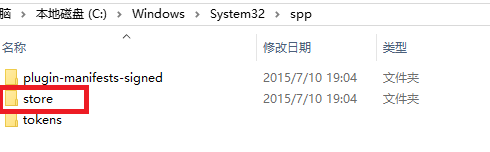
升級 Win10 後 Office 2013 失效需重新啟動,因啟動資訊儲於 C:\Windows\System32\spp\store。提供兩種還原法:

方法一:升級前備份 store 資料夾(適合未升級者)

  1. 升級前複製 C:\Windows\System32\spp\store 整個資料夾備份。

  2. 升級完成後,關閉所有 Office 程式,將備份的 store 覆蓋回原位置。

方法二:從 windows.old 取回 store(適合已升級者)

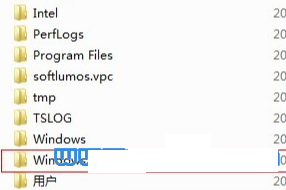
  1. 升級後 C 槽會有 windows.old 資料夾(含舊系統檔案,十幾 GB)。
  2. 進入 windows.old\Windows\System32\spp\store 找到 store 資料夾。
  3. 同方法一覆蓋回 C:\Windows\System32\spp\store。

提醒

  • 覆蓋前務必關閉所有 Office 程式。
  • windows.old 會在一段時間後自動清理,請盡快操作。
Copyright © Windows教程網 All Rights Reserved