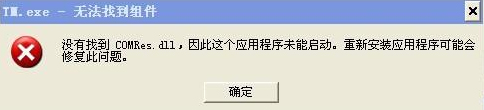
XP 缺 COMRes.dll 修復:1) 掃毒清除病毒;2) 開啟 C:\WINDOWS\system32\dllcache 找備份 comres.dll 複製;3) 貼至 C:\WINDOWS\system32;4) Win+R 輸入 regsvr32 comres.dll 註冊。若提示「找不到 DLLRegisterServer」可忽略,重開機即正常。
COMRes.dll
C:\WINDOWS\system32\dllcache
comres.dll
C:\WINDOWS\system32
regsvr32 comres.dll
Win8 如何在桌面顯示應用程式圖示?從開始畫面複製捷徑
Windows XP 無法直接升級 Windows 10 解決方案:先升 Win7/8.1 或全新安裝
Win7 系統快速啟動 Windows Movie Maker 視頻製作工具的方法
WinXP 主題變成經典模式找不回 XP 風格?啟用 Themes 服務與視覺效果
Win7 開啟 Aero 玻璃特效四法:個人化/效能選項/服務/桌面主題,附 2016 新發現點擊預設主題圖片即可啟用
WinXP 系統調整桌面圖示大小完整教學:自訂具體像素數值
Windows 10 螢幕截圖 3 大方法:內建快速鍵、QQ 截圖、瀏覽器擴充
Win8.1 開啟 QQ 提示「QQ.exe 找不到進入點」?補回 COMRes.dll 修復