Windows XP Windows 7 Windows 2003 Windows Vista Windows 綜合教學 Linux 系統教學
Windows 10 Windows 8 Windows 2008 Windows NT Windows Server 電腦軟體教學

安裝印表機驅動程式出現錯誤 126 解決方案:補齊 framedyn.dll 與環境變數修正

編輯:Win8 常見問題解答

安裝印表機驅動時跳出「錯誤 126:找不到指定的模組」,通常因系統缺少 framedyn.dll 或環境變數 Path 缺少 WBEM 路徑導致 WMI 服務異常。本文提供完整修復步驟,適用於 Windows 7/8/10/11。

根因分析

  • framedyn.dll 為 WMI (Windows Management Instrumentation) 核心元件,驅動安裝程式呼叫 WMI 查詢硬體資訊時需用到。
  • 環境變數 Path 缺少 %SystemRoot%\System32\Wbem,導致系統找不到 WMI 相關 DLL。

修復步驟

步驟 1:確認/補齊 framedyn.dll

  1. 檢查路徑 C:\Windows\System32\Wbem\framedyn.dll 是否存在。
  2. 若不存在,從同版本正常電腦複製,或從 Windows 安裝媒體 install.wim 解壓取得(DISM 指令掛載映像)。

步驟 2:修正環境變數 Path

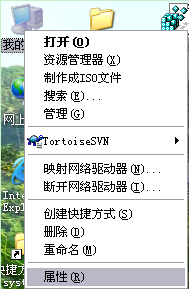
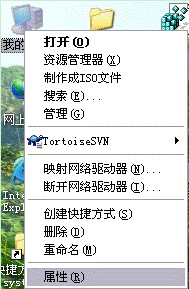
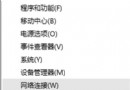
  1. 右鍵「電腦」/「此電腦」→ 「內容」→ 左側「進階系統設定」。
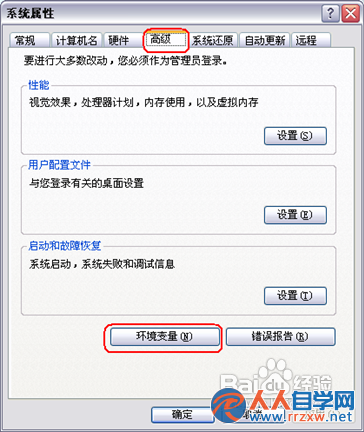
  2. 「進階」分頁 → 右下「環境變數」。
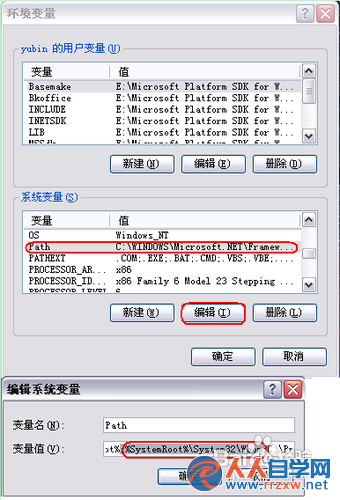
  3. 「系統變數」區找到 Path(或 PATH),點選「編輯」。
  4. 在變數值末尾加入(注意前面需有分號分隔):
;%SystemRoot%\System32\Wbem
  1. 連點三次「確定」關閉所有視窗。
  2. 重新開機讓環境變數生效。

圖文對照

framedyn.dll 檔案位置

系統內容-進階系統設定

環境變數視窗

編輯 Path 變數新增 Wbem 路徑

驗證與後續

  1. 重新開機後,再次嘗試安裝印表機驅動程式。
  2. 若仍失敗,嘗試以系統管理員身分執行安裝程式,或暫時關閉防毒軟體。
  3. 可執行 winmgmt /verifyrepository 檢查 WMI 儲存庫一致性,若報錯可用 winmgmt /salvagerepository 嘗試修復。

Copyright © Windows教程網 All Rights Reserved