部分用戶下載 Win10 正式版升級包後,重啟發現安裝程式未自動啟動。原因通常是升級協調器服務異常。解決方法:手動定位隱藏資料夾 $Windows.~WS 中的安裝程式執行。
$Windows.~WS。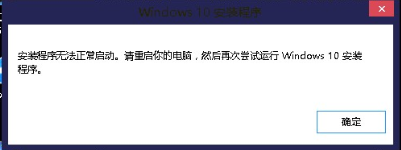
$Windows.~WS\Sources\Windows\Sources。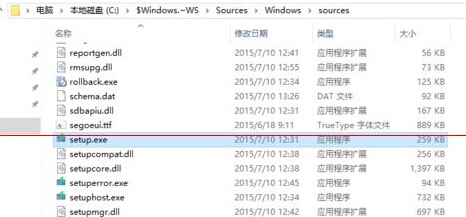
setup.exe → 升級程式正常啟動,按提示完成升級。若上述路徑不存在或執行無效,請參考「Win10 正式版安裝後許多程式無法正常啟動怎麼辦?」一文,使用媒體建立工具製作 U 盤進行就地升級修復。
解決 Windows 8 硬碟指示燈頻閃與 CPU 高佔用問題
Windows 8.1 將支援視網膜級高解析度顯示器,解決高 DPI 介面過小難題
升級 Win8.1 後 iPhone 連不上 iTunes?驅動程式手動更新解決
Windows 8.1 Update 推送未收到?手動安裝 KB2919355 解決
Windows 8 觸控螢幕桌面模式優化:調整 DPI 縮放讓觸控操作更精準
Win8 上市初期銷量不及預期:廠商產品缺乏亮點、Pro/RT 定位模糊、零售鋪貨延至明年 1 月