Windows XP Windows 7 Windows 2003 Windows Vista Windows 綜合教學 Linux 系統教學
Windows 10 Windows 8 Windows 2008 Windows NT Windows Server 電腦軟體教學

Win10 系統 hosts 檔案位置在哪?快速開啟與編輯完整指南

編輯:Win8 常見問題解答

hosts 檔案是本機域名解析對照表,常用於封鎖廣告、測試開發環境、加速特定網站存取。Windows 所有版本(含 Win10)路徑一致,本文提供標準路徑與最快開啟編輯方法。

標準路徑

C:\Windows\System32\drivers\etc\hosts

注意:若系統安裝在非 C 槽,請將 C: 替換為實際系統盤代號。

最快開啟方法:執行指令直達

  1. Win + R 開啟「執行」。
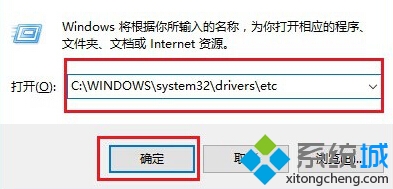
  2. 輸入完整路徑:C:\Windows\System32\drivers\etc → 確定。
  3. 執行視窗輸入 hosts 目錄路徑
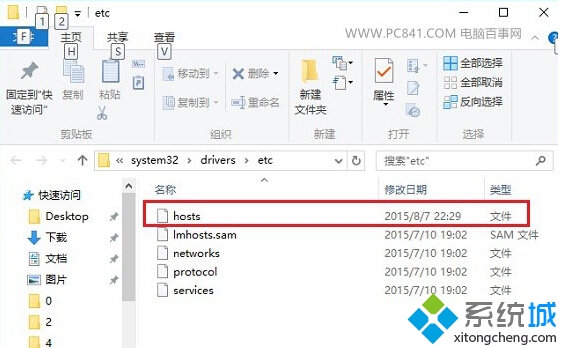
  4. 資料夾開啟後,雙擊 hosts 檔案 → 選擇「記事本」開啟編輯。
  5. etc 資料夾內 hosts 檔案

常見問題

  • etc 資料夾沒有 hosts 檔案?可能被隱藏。在資料夾「檢視」分頁勾選「隱藏的項目」,或確認檔案未被誤刪(可從備份或網路複製標準 hosts 內容新建)。
  • 編輯存檔提示「拒絕存取」?需以系統管理員身分執行記事本:搜尋「記事本」→ 右鍵「以系統管理員身分執行」→ 檔案 → 開啟 hosts 路徑 → 編輯存檔。
  • 格式規則:每行一條記錄,格式 IP地址 域名,如 127.0.0.1 www.example.com。# 開頭為註解行。

Copyright © Windows教程網 All Rights Reserved