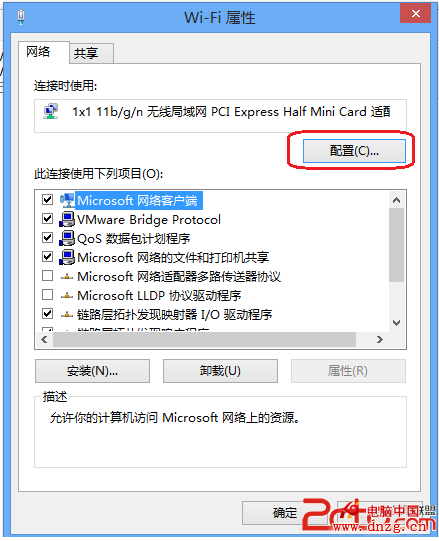
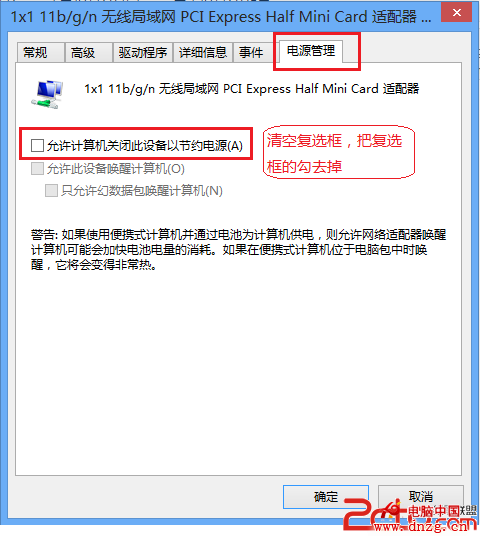
新裝 Win8 後發現無線網路頻顯「受限、正在識別」,排除路由器與驅動程式問題後,發現是無線網卡電源管理設定導致。
此設定防止系統為省電而關閉無線網卡,徹底解決頻繁斷線、重連問題。
Win8 系統如何設定鎖屏畫面?完整圖文教學
Windows 8.1 找回 Win+X 選單中的命令提示字元(取代 PowerShell)
Windows 8/7 快速查詢系統是否完整啟用:四條 SLMGR 指令
Win8 軟體精選:行動網際網路時代必備應用——UC 瀏覽器 HD、南都網 HD、蘇寧閱讀
Win8 圖片密碼設定教學:觸控裝置專屬的手勢解鎖,安全又有趣
Win8 開關機秒開秘籍:混合式關機(核心會話休眠)原理解析
Windows 8 安裝 Oracle 11g 報錯 [INS-13001] 環境不滿足最低需求:修改 cvu_prereq.xml 解決相容性檢查
Win8 計算機在哪裡?兩種快速找到內建計算機的方法