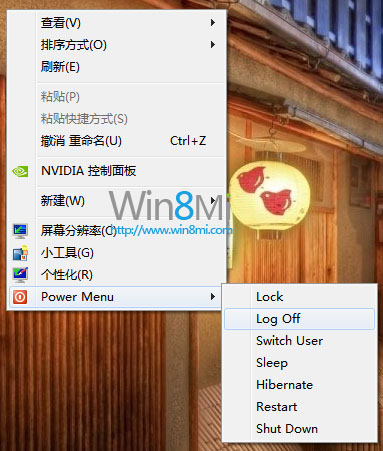
Windows 8 移除傳統開始選單,關機操作變得繁瑣(需呼叫 Charms 列 > 設定 > 電源 > 關機)。透過修改登錄檔,可在桌面右鍵選單(或檔案總管背景右鍵)直接新增「電源選單」子選單,包含鎖定、登出、切換使用者、睡眠、休眠、重新開機、關機,一鍵直達,大幅提升效率。
Add_Power_Menu.reg(編碼請選 ANSI 或 UTF-8 with BOM)。Windows Registry Editor Version 5.00
[HKEY_CLASSES_ROOT\DesktopBackground\Shell\Power Menu]
"MUIVerb"="Power Menu"
"SubCommands"="lock;logoff;switch;sleep;hibernate;restart;shutdown"
"Icon"="shell32.dll,215"
"Position"="bottom"
[HKEY_LOCAL_MACHINE\SOFTWARE\Microsoft\Windows\CurrentVersion\Explorer\CommandStore\shell\lock]
@="Lock"
[HKEY_LOCAL_MACHINE\SOFTWARE\Microsoft\Windows\CurrentVersion\Explorer\CommandStore\shell\lock\command]
@="Rundll32 User32.dll,LockWorkStation"
[HKEY_LOCAL_MACHINE\SOFTWARE\Microsoft\Windows\CurrentVersion\Explorer\CommandStore\shell\logoff]
@="Log Off"
[HKEY_LOCAL_MACHINE\SOFTWARE\Microsoft\Windows\CurrentVersion\Explorer\CommandStore\shell\logoff\command]
@="Shutdown -l"
[HKEY_LOCAL_MACHINE\SOFTWARE\Microsoft\Windows\CurrentVersion\Explorer\CommandStore\shell\switch]
@="Switch User"
[HKEY_LOCAL_MACHINE\SOFTWARE\Microsoft\Windows\CurrentVersion\Explorer\CommandStore\shell\switch\command]
@="tsdiscon.exe"
[HKEY_LOCAL_MACHINE\SOFTWARE\Microsoft\Windows\CurrentVersion\Explorer\CommandStore\shell\sleep]
@="Sleep"
[HKEY_LOCAL_MACHINE\SOFTWARE\Microsoft\Windows\CurrentVersion\Explorer\CommandStore\shell\sleep\command]
@="rundll32.exe powrprof.dll,SetSuspendState Sleep"
[HKEY_LOCAL_MACHINE\SOFTWARE\Microsoft\Windows\CurrentVersion\Explorer\CommandStore\shell\hibernate]
@="Hibernate"
[HKEY_LOCAL_MACHINE\SOFTWARE\Microsoft\Windows\CurrentVersion\Explorer\CommandStore\shell\hibernate\command]
@="Shutdown -h"
[HKEY_LOCAL_MACHINE\SOFTWARE\Microsoft\Windows\CurrentVersion\Explorer\CommandStore\shell\restart]
@="Restart"
[HKEY_LOCAL_MACHINE\SOFTWARE\Microsoft\Windows\CurrentVersion\Explorer\CommandStore\shell\restart\command]
@="Shutdown -r -f -t 00"
[HKEY_LOCAL_MACHINE\SOFTWARE\Microsoft\Windows\CurrentVersion\Explorer\CommandStore\shell\shutdown]
@="Shut Down"
[HKEY_LOCAL_MACHINE\SOFTWARE\Microsoft\Windows\CurrentVersion\Explorer\CommandStore\shell\shutdown\command]
@="Shutdown -s -f -t 00"
regedit 開啟登錄編輯器。HKEY_CLASSES_ROOT\DesktopBackground\Shell,新增機碼命名為 Power Menu。Power Menu 下新增字串值:MUIVerb = Power Menu (顯示名稱)SubCommands = lock;logoff;switch;sleep;hibernate;restart;shutdown (子命令清單,分號分隔)Icon = shell32.dll,215 (圖示)Position = bottom (顯示位置:底部)HKEY_LOCAL_MACHINE\SOFTWARE\Microsoft\Windows\CurrentVersion\Explorer\CommandStore\shell,依序為每個子命令建立機碼與 command 子機碼,設定預設值為對應執行指令(見上方登錄檔)。將以下內容存為 Remove_Power_Menu.reg 執行:
Windows Registry Editor Version 5.00

[-HKEY_CLASSES_ROOT\DesktopBackground\Shell\Power Menu]
[-HKEY_LOCAL_MACHINE\SOFTWARE\Microsoft\Windows\CurrentVersion\Explorer\CommandStore\shell\lock]
[-HKEY_LOCAL_MACHINE\SOFTWARE\Microsoft\Windows\CurrentVersion\Explorer\CommandStore\shell\logoff]
[-HKEY_LOCAL_MACHINE\SOFTWARE\Microsoft\Windows\CurrentVersion\Explorer\CommandStore\shell\switch]
[-HKEY_LOCAL_MACHINE\SOFTWARE\Microsoft\Windows\CurrentVersion\Explorer\CommandStore\shell\sleep]
[-HKEY_LOCAL_MACHINE\SOFTWARE\Microsoft\Windows\CurrentVersion\Explorer\CommandStore\shell\hibernate]
[-HKEY_LOCAL_MACHINE\SOFTWARE\Microsoft\Windows\CurrentVersion\Explorer\CommandStore\shell\restart]
[-HKEY_LOCAL_MACHINE\SOFTWARE\Microsoft\Windows\CurrentVersion\Explorer\CommandStore\shell\shutdown]
shutdown.exe -s -t 0 (關機) 或 shutdown.exe -r -t 0 (重開機) > 命名 > 完成。可釘選到工作列/開始畫面。