企業環境常使用 PAC 檔自動管理代理設定。Windows 8 可透過 Internet 選項快速啟用自動設定指令碼。
操作步驟
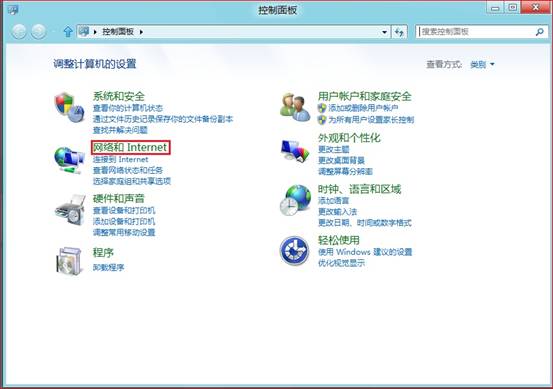
- 開啟「控制台」 → 「網路和網際網路」 → 「網路和共用中心」。
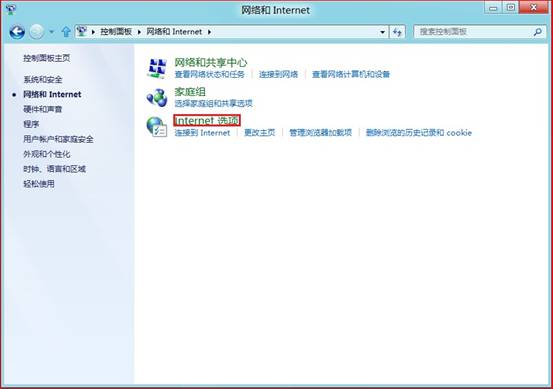
- 點選左側「Internet 選項」。
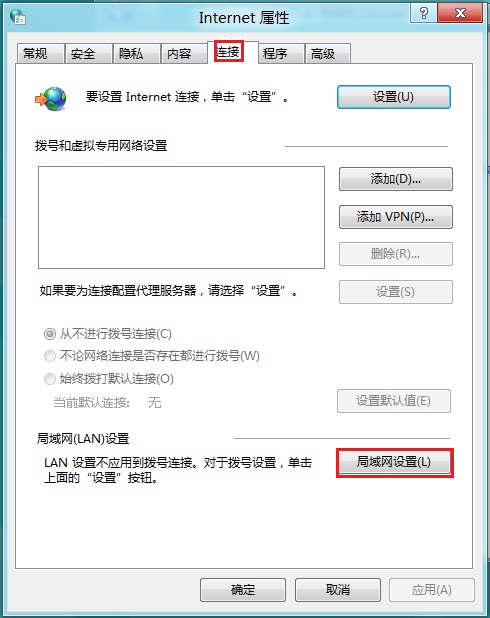
- 切換到「連線」索引標籤 → 點選「區域網路 (LAN) 設定」。
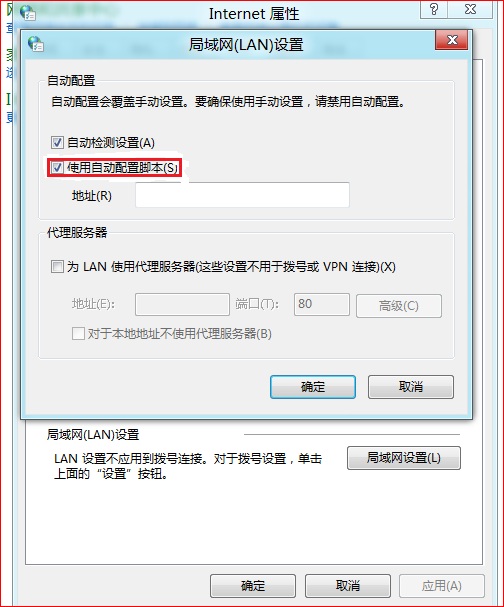
- 勾選「使用自動設定指令碼」,在「位址」欄輸入 PAC 檔 URL(如
https://proxy.company.com/proxy.pac),確定。
電腦常識
補充說明
- PAC (Proxy Auto-Config) 為 JavaScript 檔案,定義瀏覽器根據 URL 決定是否走代理。
- 此設定影響 IE、Chrome、Edge 等使用系統代理的瀏覽器;Firefox 需單獨設定。
- 若 PAC 檔需驗證,請確認伺服器端已正確設定存取權限。
四步驟搞定企業代理自動設定!